Educational coding robots for kids range from screen-free toys that teach sequencing to programmable kits that introduce sensors, robotics, and code. My best overall pick is Wonder Workshop Dash for its approachable coding activities and room to grow; Botley 2.0 stands out for screen-free play, while Makeblock Codey Rocky offers a stronger step toward app-based coding. The main tradeoff is simplicity versus depth: beginner-friendly robots are easier to start, while buildable and programmable kits ask for more patience and adult help. Age guidance matters, but a child’s interest in assembling, experimenting, or solving puzzles matters just as much. Continue reading for the full breakdown and help matching a robot to the learner.

Prime made for students and young adults
- Fast, free delivery for dorm and study essentials
- Prime Video and Amazon Music included
- Member-only deals
Key Takeaways
- Dash is the most balanced learning path in this lineup: it suits children ready for app-based coding activities without requiring them to assemble a robot first.
- Botley 2.0 and the Botley Activity Set prioritize screen-free sequencing: choose them for hands-on command practice, not for the deeper programming tools found in app-based kits.
- Codey Rocky and the mBot kits serve different stages: Codey Rocky is an interactive route into coding, while mBot kits lean more toward construction and technical exploration.
- The ELEGOO UNO R3 car kit is the most technically demanding direction: its camera and Arduino-oriented approach better fits older learners with adult guidance than young first-time coders.
- Several products overlap in name and purpose: compare the included activities and components in the specific Botley, Robot Mouse, and mBot bundles rather than assuming similarly named sets are identical.
| Learning Resources Botley 2.0 Coding Robot Activity Set |  | Best Overall Screen-Free Set | Brand: Learning Resources | Model: LER2938 | Age range: 5–10 years | VIEW LATEST PRICE | See Our Full Breakdown |
| Learning Resources Botley the Coding Robot |  | Best for Logic-Building Beginners | Brand: Learning Resources | Model number: LER2936 | Age range: 5+ years | VIEW LATEST PRICE | See Our Full Breakdown |
| Educational Insights PYXEL Coding Robot for Kids |  | Best for Blockly-to-Python Progression | Brand: Educational Insights | Model name: PYXEL Coding Pet | Model number: 1130 | VIEW LATEST PRICE | See Our Full Breakdown |
| ELEGOO UNO R3 Smart Robot Car Kit V4 with Camera |  | Best for Older Kids Who Want to Build | Brand: ELEGOO | Model number: US-EL-KIT-012 | Recommended age: 12 years and up | VIEW LATEST PRICE | See Our Full Breakdown |
| Makeblock Codey Rocky Interactive Coding Robot for Kids 6-12 |  | Best Interactive Coding Companion | Brand: Makeblock | Model number: P1030024 | Age range: 6 years and up | VIEW LATEST PRICE | See Our Full Breakdown |
| Wonder Workshop Dash Robot – Coding Robot for Kids |  | Best Interactive Beginner Robot | Brand: Wonder Workshop | Model: DA01 | Age range: 6 years and up | VIEW LATEST PRICE | See Our Full Breakdown |
| Teach Tech Mech-5 STEM Coding Robot Building Kit |  | Best for Mechanical Coding | Brand: Teach Tech | Model: TTC-895 | Recommended age: 10 years and up | VIEW LATEST PRICE | See Our Full Breakdown |
| Learning Resources Code & Go Robot Mouse Activity Set | 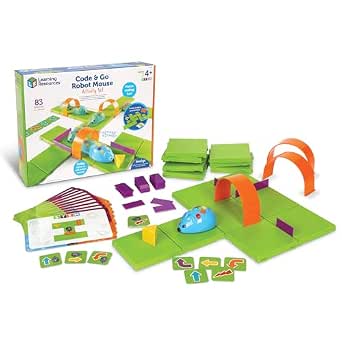 | Best for Preschool Maze Coding | Brand: Learning Resources | Model: LER2831 | Age range: 4 years and up | VIEW LATEST PRICE | See Our Full Breakdown |
| Makeblock mBot V1.2 Arduino Robot Kit with Scratch Coding Box |  | Best for Growing Coding Skills | Brand: Makeblock | Model: mBot V1.2 (mBot-K08-01) | Recommended age: 8 years and up | VIEW LATEST PRICE | See Our Full Breakdown |
| Learning Resources Botley The Coding Robot Activity Set | 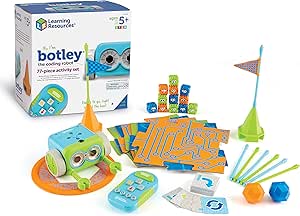 | Best Screen-Free Starter Set | Brand: Learning Resources | Model: LER2935 | Age range: 5 years and up | VIEW LATEST PRICE | See Our Full Breakdown |
| Thames & Kosmos My Robotic Pet: Coding Chameleon Robotics Kit |  | Best Screen-Free Robotic Pet | Brand: Thames & Kosmos | Model number: 620507 | Product type: Robotics kit | VIEW LATEST PRICE | See Our Full Breakdown |
| HPROMOT STEM Robot Building Kit for Kids Ages 8-16 |  | Best for Multi-Model Building | Brand: HPROMOT | Model number: T1120 | Age range: 8–16 years | VIEW LATEST PRICE | See Our Full Breakdown |
| Kids First Coding & Robotics Kit |  | Best for Early Learners | Brand: Thames & Kosmos | Model number: 567012 | Age range: 4–8 years | VIEW LATEST PRICE | See Our Full Breakdown |
| Ozobot Ozo at Home STEM Coding Robot Kit for Ages 5+ |  | Best for a Screen-Free-to-Blockly Progression | Brand: Ozobot | Model number: 70101KIT | Recommended age: 5 years and up | VIEW LATEST PRICE | See Our Full Breakdown |
| Makeblock mBot STEM Coding Robot Kit for Kids Ages 8+ | 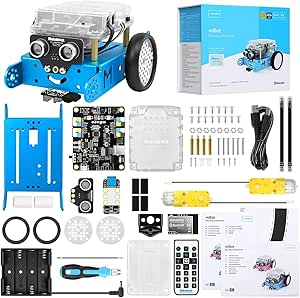 | Best for a Coding-to-Robotics Pathway | Brand: Makeblock | Model: 90053 | Recommended age: 8 years and up | VIEW LATEST PRICE | See Our Full Breakdown |
| educational coding robots for kid | Brand | Age range | Included components | Model number |
|---|---|---|---|---|
| Learning Resources Botley 2.0 | Learning Resources | 5–10 years | Coding robot, remote programmer, 40 coding cards, 6 double-sided boards, and stackable obstacle pieces | — |
| Learning Resources Botley the | Learning Resources | 5+ years | Botley robot, remote programmer, detachable arms, 42 coding cards, tiles, and obstacles | LER2936 |
| Educational Insights PYXEL Cod | Educational Insights | 8–14 years | PYXEL robot, USB-C cord, Code Activator, and guide | 1130 |
| ELEGOO UNO R3 Smart Robot Car | ELEGOO | — | — | US-EL-KIT-012 |
| Makeblock Codey Rocky Interact | Makeblock | 6 years and up | — | P1030024 |
| Wonder Workshop Dash Robot | Wonder Workshop | 6 years and up | Dash Robot, 2 building brick connectors, USB charging cable | — |
| Teach Tech Mech-5 STEM Coding | Teach Tech | — | Assembly parts and instruction manual | — |
| Learning Resources Code & Go R | Learning Resources | 4 years and up | Robot mouse, 16 maze grids, 22 maze walls, 3 tunnels, 30 coding cards, 10 activity cards, cheese wedge, activity guide | — |
| Makeblock mBot V1.2 Arduino Ro | Makeblock | — | mCore mainboard, 2 motors, line-follower sensor, chassis, wheels, RJ25 cables, remote controller, USB cable, battery holder, screwdrivers | — |
| Learning Resources Botley The | Learning Resources | 5 years and up | — | — |
| Thames & Kosmos My Robotic Pet | Thames & Kosmos | — | — | 620507 |
| HPROMOT STEM Robot Building Ki | HPROMOT | 8–16 years | — | T1120 |
| Kids First Coding & Robotics K | Thames & Kosmos | 4–8 years | — | 567012 |
| Ozobot Ozo at Home STEM Coding | Ozobot | — | One Ozo at Home robot and one charging cable | 70101KIT |
| Makeblock mBot STEM Coding Rob | Makeblock | — | — | — |
More Details on Our Top Picks
Learning Resources Botley 2.0 Coding Robot Activity Set
Botley 2.0 is my strongest pick for younger children who should learn sequencing away from a screen. Its 78-piece activity set gives kids boards, coding cards, and obstacles for setting up challenges, while multi-step commands and object sensing make their instructions produce visible results. Compared with the original Botley the Coding Robot, this version adds 45-degree turns and secret code combinations, giving play more variety; the original, however, specifies longer sequences and loop and if/then commands. Lights, sounds, and music add appeal, but the hands-on format means children or caregivers must arrange the materials and reset activities. I’d choose Botley 2.0 for tactile, open-ended play, not for a child ready to move into app-based Blockly or Python.
Pros:- Screen-free programming uses a remote programmer and physical coding cards.
- Six double-sided boards and stackable obstacles support varied custom challenges.
- Multi-step sequences, 45-degree turns, and object sensing introduce several coding ideas.
- Lights, sounds, and music provide immediate sensory feedback.
Cons:- Children need to arrange and reset the physical cards and activity pieces.
- It does not offer the stated loop and if/then commands found on the original Botley.
- The manufacturer provides no warranty.
Best for: Families with children ages 5–10 who want screen-free coding activities that can be rearranged into new obstacle courses.
Not ideal for: Children seeking app-based coding or longer, logic-heavy programming; the original Botley specifies up to 80 steps and loop and if/then commands.
- Brand:Learning Resources
- Model:LER2938
- Age range:5–10 years
- Piece count:78
- Included components:Coding robot, remote programmer, 40 coding cards, 6 double-sided boards, and stackable obstacle pieces
- Coding features:Multi-step sequences, 45-degree turns, object sensing, and 16 secret code combinations
- Screen-free:Yes
- Warranty:No warranty
Our verdict“Choose Botley 2.0 for a well-equipped, screen-free activity set; pick the original Botley if extended command sequences and logic commands matter more.”
Learning Resources Botley the Coding Robot
The original Botley suits children who are ready to move beyond simple move-and-turn commands while keeping screens out of the activity. Its remote programmer handles sequences of up to 80 steps, and loop and if/then commands give kids a way to explore how repeated instructions and conditions change a route. That makes it a more logic-focused choice than Botley 2.0, whose supplied boards, obstacles, and sensory features lean toward varied hands-on challenges. Botley’s cards, tiles, obstacles, and detachable arms make the kit ready for physical play, but the command interface and pieces still require setup. It is a practical bridge for children who want more structured coding concepts, though it does not offer the Blockly-to-Python progression of PYXEL.
Pros:- Programs sequences of up to 80 steps.
- Loop and if/then commands introduce logic beyond basic movement.
- Screen-free remote programming keeps the activity hands-on.
- Includes coding cards, tiles, obstacles, and detachable arms for varied play.
Cons:- Physical cards and obstacles need to be arranged for activities.
- The manufacturer provides no warranty.
- Its remote-and-card approach offers less progression into text-based coding than PYXEL.
Best for: Families and educators seeking screen-free practice with sequencing, loops, and if/then logic for children beginning around age five.
Not ideal for: Older children looking for Python, app-based programming, or a more advanced robotics build; this is a card-and-remote coding robot.
- Brand:Learning Resources
- Model number:LER2936
- Age range:5+ years
- Included components:Botley robot, remote programmer, detachable arms, 42 coding cards, tiles, and obstacles
- Programming steps:Up to 80
- Features:Screen-free operation, loop commands, if/then logic, and black line following
- Manufacturer:Learning Resources
- UPC:765023029369
Our verdict“Pick the original Botley when screen-free logic commands matter more than Botley 2.0’s larger activity set or PYXEL’s software-based coding progression.”
Educational Insights PYXEL Coding Robot for Kids
PYXEL is the clearest choice here for kids who want coding to grow beyond physical command cards. It supports Blockly and Python, so a beginner can start with visual blocks and later try a text-based language on the same robot. Compared with Botley the Coding Robot, PYXEL is better suited to sustained software learning, while Botley is simpler to start with and does not require a tablet or computer. Built-in tutorials and programming for tricks, lights, and sounds give learners guided ways to make code do something visible. The tradeoff is that PYXEL needs a Wi-Fi-enabled tablet or computer to connect and program, even though it does not require internet access or an external app. Its 8–14 age range also makes it less suited to the youngest coding beginners.
Pros:- Supports both Blockly and Python on one robot.
- Built-in tutorials can guide independent practice.
- Programming tricks, lights, and sounds connects code to visible robot behavior.
- Rechargeable battery avoids routine battery replacement.
Cons:- Requires a Wi-Fi-enabled tablet or computer for programming.
- Its recommended age range starts at eight, limiting its fit for younger beginners.
- Unlike Botley, it is not a screen-free, physical-card coding activity.
Best for: Families with children ages 8–14 who have access to a Wi-Fi-enabled computer or tablet and want a path from block coding to Python.
Not ideal for: Younger children or households seeking a fully screen-free robot that works with physical cards and a remote, such as Botley 2.0.
- Brand:Educational Insights
- Model name:PYXEL Coding Pet
- Model number:1130
- Age range:8–14 years
- Coding languages:Blockly and Python
- Connectivity:Password-protected Wi-Fi
- Power source:Built-in rechargeable battery
- Included components:PYXEL robot, USB-C cord, Code Activator, and guide
Our verdict“Choose PYXEL for a child ready to progress from Blockly toward Python, provided a compatible tablet or computer is available.”
ELEGOO UNO R3 Smart Robot Car Kit V4 with Camera
This ELEGOO kit is for older learners who want to assemble a working robot car as well as program one. Its UNO R3 controller, sensors, motors, and guided wiring put engineering tasks alongside coding, while the camera adds FPV video streaming that the companion-style Makeblock Codey Rocky does not list. Line tracking and obstacle avoidance turn programs into practical driving behaviors rather than just gestures or sounds. That extra hardware creates a steeper start: the kit is recommended for ages 12 and up, and first-time builders may need adult guidance. Compared with PYXEL, this is more focused on assembly and vehicle functions than a Blockly-to-Python learning path. Its acrylic and plastic construction is also less robust than a metal chassis might be.
Pros:- UNO R3 controller, sensors, and motors make the kit a hands-on robotics build.
- Camera module supports FPV video streaming.
- Line tracking and obstacle avoidance connect code with driving behavior.
- Keyed connectors help reduce wiring mistakes during assembly.
Cons:- First-time builders may need adult guidance, and the recommended age is 12 and up.
- Assembly and programming present a steeper learning curve than Botley 2.0.
- Acrylic and plastic construction may be less durable than a metal chassis.
Best for: Teens aged 12 and up, or adult-supported classrooms, that want to learn robotics through assembly, sensors, and programmable car behavior.
Not ideal for: Younger children seeking a ready-to-play coding companion or a simple screen-free starter; this kit involves assembly and a steeper programming learning curve.
- Brand:ELEGOO
- Model number:US-EL-KIT-012
- Recommended age:12 years and up
- Controller board:ELEGOO UNO R3
- Connectivity:Wi-Fi, Bluetooth, and IR
- Battery:2000 mAh rechargeable lithium-ion
- Materials:Acrylic and plastic
- Dimensions:8 x 7 x 6 inches
- Weight:1.23 kg
Our verdict“Choose this kit for an older child who wants to build and program a camera-equipped robot car, not for a young beginner seeking quick coding play.”
Makeblock Codey Rocky Interactive Coding Robot for Kids 6-12
Codey Rocky combines a friendly panda-shaped design with a coding path that can advance from Scratch to Python. That gives it a different role from Botley 2.0: Botley is the more straightforward screen-free choice for physical sequencing, while Codey Rocky is better for children ready to use programming tools and explore more expressive robot behavior. Emotions and sound effects can make outputs feel personal, and compatibility with building blocks adds a route for creative extensions. Its impact-resistant materials and one-year warranty are useful practical advantages. The limits are its age focus of six and up and the guidance needed to make meaningful use of Python; families wanting coding without a device may prefer Botley instead.
Pros:- Supports progression from Scratch to Python.
- Expressive emotions and sound effects give programs an engaging output.
- Impact-resistant materials suit hands-on play.
- Building-block compatibility supports creative extensions.
Cons:- Advanced Python features may require coding knowledge or adult guidance.
- The stated age focus of 6–12 may limit its appeal outside that range.
- Unlike Botley 2.0, it is not presented as a screen-free, physical-card coding set.
Best for: Children ages 6–12 who want an engaging robot that can support a move from Scratch coding toward Python, with adult help as needed.
Not ideal for: Families prioritizing screen-free programming with physical cards, or older learners seeking a dedicated robot-car engineering build like the ELEGOO UNO R3 kit.
- Brand:Makeblock
- Model number:P1030024
- Age range:6 years and up
- Programming languages:Scratch and Python
- Shape:Panda
- Material:Impact-resistant materials
- Compatibility:Building blocks
- Warranty:1 year
Our verdict“Choose Codey Rocky for a child who wants an expressive robot and a path from Scratch toward Python, rather than a screen-free starter or a build-your-own car.”
Wonder Workshop Dash Robot – Coding Robot for Kids
Dash is the most play-forward app-enabled pick in this group: children can give voice commands, steer around obstacles, and make it sing or dance while practicing sequencing, loops, and algorithms. Unlike the Code & Go Robot Mouse, which focuses on planning a route through a physical maze, Dash responds dynamically and works with apps across iOS, Android, and Fire OS. It also arrives ready to use, so there is no build session before the coding starts. That convenience comes with a narrower learning ceiling: the listed age range is 6–11, and older children seeking a path into text-based coding may get more from the Makeblock mBot. Dash has no camera for visual recognition and is intended for indoor play, so it suits interactive fundamentals better than advanced robotics projects.
Pros:- No assembly required, so children can begin exploring right away
- Introduces sequencing, loops, and algorithms through interactive activities
- Compatible with iOS, Android, and Fire OS through dedicated apps
- Voice activation and obstacle navigation add responsive play
Cons:- No camera, limiting visual recognition projects
- Designed for indoor use rather than outdoor exploration
- Its age range may feel limiting to older children or advanced coders
Best for: Families with children ages 6–11 who want an immediately usable, app-connected robot for playful coding practice.
Not ideal for: Older beginners or advanced young coders who want camera-based sensing, outdoor use, or a clear progression to text-based programming.
- Brand:Wonder Workshop
- Model:DA01
- Age range:6 years and up
- Dimensions:7.17 x 6.69 x 6 inches
- Weight:0.7 kg
- Connectivity:App-enabled; iOS, Android, and Fire OS
- Power and battery life:Rechargeable lithium-ion battery; up to 5 hours
- Included components:Dash Robot, 2 building brick connectors, USB charging cable
Our verdict“Choose Dash for an interactive, app-enabled introduction to coding, but pick the Makeblock mBot if your child wants a more technical progression.”
Teach Tech Mech-5 STEM Coding Robot Building Kit
Mech-5 makes the robot itself the lesson: children assemble the mechanism, then arrange coding buttons on a wheel to control actions such as lifting, kicking, throwing, and drawing. That tactile approach differs from Dash and Botley, where children program ready-made robots; here, mechanical construction and command logic are linked from the start. It is a strong fit for a patient child who enjoys building and wants to see how programmed instructions produce physical movement. The tradeoff is time and complexity: assembly takes multiple hours, and the mechanical interface may be less intuitive than the arrow-button programming on the Botley Activity Set. It also forgoes app-based coding and runs without batteries, which is a benefit for screen-free learning but leaves less room for software-driven progression.
Pros:- Combines hands-on robot assembly with programming concepts
- Coding buttons provide a tangible, screen-free way to plan actions
- Mechanical tasks show how commands create physical results
- Operates without batteries
Cons:- Multi-hour assembly can frustrate children who want to start coding quickly
- Mechanical programming may take more effort to understand than app or arrow-button controls
- The age recommendation and build complexity make it a poor fit for younger beginners
Best for: Children ages 10 and up who enjoy detailed builds and want to connect mechanical engineering with basic coding logic.
Not ideal for: Younger children or families looking for a quick-start robot with app tutorials, animated feedback, or a short setup.
- Brand:Teach Tech
- Model:TTC-895
- Recommended age:10 years and up
- Educational focus:STEM, coding, and mechanical engineering
- Assembly:Required
- Power:No batteries required
- Included components:Assembly parts and instruction manual
- Warranty:1-year manufacturer warranty
Our verdict“Choose Mech-5 for an older child who wants a substantial mechanical build; choose Botley for simpler, immediate screen-free coding play.”
Learning Resources Code & Go Robot Mouse Activity Set
Code & Go gives young learners a concrete route-planning challenge: they build a maze, arrange coding cards, and enter button commands to guide Colby toward the cheese. Its 83 pieces make it more adaptable for repeated maze variations than Botley’s obstacle-course format, while the mouse’s lights, sounds, and two speeds give children feedback as they test a sequence. This screen-free setup suits classrooms and homes that want coding basics without app setup. The age range starts at 4, giving it a younger entry point than the Mech-5 or Makeblock mBot. Its focus is also narrower: it teaches sequencing and logic through maze navigation rather than offering a broader path into robotics programming. Batteries are not included, and the product has no manufacturer warranty.
Pros:- Screen-free controls and coding cards make commands visible and approachable
- 83 pieces support varied maze layouts and repeat play
- Lights, sounds, and two speeds provide feedback during activities
- Suitable for home use and classroom STEM centers
Cons:- Requires 3 AAA batteries, which are not included
- No manufacturer warranty is listed
- Maze navigation offers a narrower coding experience than app-programmable robots such as Dash
Best for: Preschool and early-elementary families or educators seeking a screen-free, reusable maze activity for introducing sequences and logic.
Not ideal for: Older children looking for programmable sensors, app-based lessons, or a progression beyond route-planning challenges.
- Brand:Learning Resources
- Model:LER2831
- Age range:4 years and up
- Piece count:83 pieces
- Maze board size:20 x 20 inches
- Power:3 AAA batteries, not included
- Robot features:Lights, sounds, and two speeds
- Included components:Robot mouse, 16 maze grids, 22 maze walls, 3 tunnels, 30 coding cards, 10 activity cards, cheese wedge, activity guide
- Warranty:No warranty
Our verdict“Choose Code & Go for young children learning sequences through hands-on mazes, not for a long-term progression into advanced robot coding.”
Makeblock mBot V1.2 Arduino Robot Kit with Scratch Coding Box
mBot offers the clearest route from block coding toward text-based programming in this set. Children can start with Scratch and guided projects such as line-following and obstacle avoidance, then move toward Arduino as their skills grow. That progression gives it a longer learning horizon than the Code & Go Robot Mouse or Botley Activity Set, both of which center on screen-free commands. Assembly is listed at about 15 minutes, making the initial build less demanding than Mech-5’s multi-hour construction. In return, mBot asks for more technical involvement: younger learners may need adult help with Arduino, and AA batteries are not included. Choose it when the goal is to explore sensors, motors, and increasingly complex code rather than just practice basic sequencing.
Pros:- Supports Scratch, mBlock, and Arduino for a broader coding progression
- Line-following and obstacle-avoidance projects demonstrate robotics concepts
- Approximately 15-minute assembly gets the robot ready for projects quickly
- Includes motors, sensor, remote controller, tools, and guided online courses
Cons:- AA batteries are required but not included
- Younger children may need significant parental help with Arduino programming
- Its app- and computer-based learning is less suitable for families seeking screen-free coding
Best for: Families with children ages 8 and up who want guided block coding now and the option to explore Arduino programming later.
Not ideal for: Buyers seeking a fully screen-free toy, a battery-ready kit, or coding activities that do not need adult support as skills advance.
- Brand:Makeblock
- Model:mBot V1.2 (mBot-K08-01)
- Recommended age:8 years and up
- Coding platforms:Scratch, Arduino, and mBlock
- Connectivity:Bluetooth
- Assembly time:Approximately 15 minutes
- Learning resources:Instruction guide and 8 step-by-step online courses
- Included components:mCore mainboard, 2 motors, line-follower sensor, chassis, wheels, RJ25 cables, remote controller, USB cable, battery holder, screwdrivers
Our verdict“Choose mBot for a child ready to grow from block-based coding into Arduino; choose Dash or Botley for more immediate, play-led basics.”
Learning Resources Botley The Coding Robot Activity Set
Botley is built for children who need coding to stay screen-free: a remote programmer sends arrow-button commands, while the 77-piece set provides cards and obstacle-course parts for planning and testing routes. Its object detection, looping commands, and line following add more variety than the maze-centered Code & Go Robot Mouse, while keeping the interaction more direct than Dash’s app-based activities. That simplicity makes Botley a practical fit for ages 5–7 and for homes or classrooms that do not want a phone or tablet involved. The tradeoff is a limited age window; older children may want the broader Scratch-to-Arduino progression offered by the Makeblock mBot. The robot and remote also need separate AAA batteries, which are not included, and no manufacturer warranty is listed.
Pros:- Works without a phone, tablet, Bluetooth, or Wi-Fi
- Remote programmer and arrow commands make early sequences accessible
- 77-piece set supports obstacle courses, mazes, and coding-card activities
- Includes object detection, looping commands, and line following
Cons:- Requires 3 AAA batteries for the robot and 2 AAA batteries for the remote; none are included
- No manufacturer warranty is listed
- Its intended age range may limit appeal as a child’s coding skills advance
Best for: Families and early-years educators seeking a screen-free robot with guided obstacle-course activities for children around ages 5–7.
Not ideal for: Older children seeking app-based projects, text coding, or a robot that can be used without supplying batteries separately.
- Brand:Learning Resources
- Model:LER2935
- Age range:5 years and up
- Piece count:77 pieces
- Power:3 AAA batteries for robot and 2 AAA batteries for remote; not included
- Connectivity:Screen-free; no Bluetooth or Wi-Fi required
- Educational focus:Coding, critical thinking, logic, and problem-solving
- Coding features:Object detection, looping commands, and line following
Our verdict“Choose Botley for straightforward, screen-free coding practice for younger children; choose mBot when a more technical learning path matters.”
Thames & Kosmos My Robotic Pet: Coding Chameleon Robotics Kit
The Coding Chameleon suits kids who want a creature to build and interact with, not just a vehicle to steer. Its physical action cards introduce programming without a screen, while color and infrared sensors let the finished chameleon respond to touch and gestures with lights and tongue movement. Wild and Pet modes add play beyond the coding activity, and the 48-page manual connects assembly to robotics and biomimicry. Compared with the story-led Kids First Coding & Robotics Kit, this build offers a more creature-focused experience but fewer structured, named coding concepts. The tradeoff is the assembly: younger builders may need adult help, and batteries are recommended but not listed among the included components. Choose it for tactile, screen-free robot play rather than a path toward app-based coding.
Pros:- Physical action cards allow programming without a screen or software.
- Color and infrared sensors support responsive interaction.
- Three modes combine coding, roaming behavior, and pet-style play.
- 48-page manual explains robotics concepts and biomimicry.
Cons:- Assembly may require adult help, particularly for younger children.
- Batteries are recommended but are not listed among included components.
Best for: Children ages 8–12 who enjoy building animals and want hands-on, screen-free coding with interactive play modes.
Not ideal for: Families seeking a ready-to-play robot or app-based programming; assembly may need adult help, and batteries are not listed as included.
- Brand:Thames & Kosmos
- Model number:620507
- Product type:Robotics kit
- Length:15 inches
- Sensors:Color sensor and infrared sensor
- Play modes:Coding Mode, Wild Mode, and Pet Mode
- Coding method:Physical colored action cards; no screen or software required
- Manual:48 pages
- Recommended age:8–12 years; adult help recommended for ages 8+, independent play suggested for ages 12+
Our verdict“Pick the Coding Chameleon for a screen-free build-and-play pet; choose Kids First instead for more explicit early-grade coding lessons.”
HPROMOT STEM Robot Building Kit for Kids Ages 8-16
The HPROMOT 757-piece kit is the pick here for children who want construction to be a major part of learning. Its parts can form five robot models, so the engineering challenge changes as kids rebuild rather than ending with one completed design. Four control modes span remote operation, path and gravity-based play, and app programming; a rechargeable robot battery also avoids buying separate batteries for the main unit. Compared with the Makeblock mBot, HPROMOT emphasizes multiple builds, while mBot offers a clearer route into Scratch, Arduino, and compatible add-ons. That makes this kit less suited to families prioritizing a named programming ecosystem. App pairing also requires Bluetooth and location permissions, and the remote needs two AAA batteries that are not included. Small parts rule it out for children under three.
Pros:- 757 pieces support construction of five distinct robot models.
- Four control modes include remote, path, gravity, and programming options.
- Built-in rechargeable battery powers the robot body.
- Plastic construction is described as child-friendly and quality-tested.
Cons:- Remote controller requires two AAA batteries that are not included.
- App pairing requires Bluetooth and location permissions to be enabled.
- The product data does not identify a particular coding language or platform.
Best for: Ages 8–16 who enjoy rebuilding models and want a kit that combines hands-on construction with remote and app controls.
Not ideal for: Families focused on a clearly specified Scratch or Arduino learning path, or buyers who want app pairing without device-permission setup.
- Brand:HPROMOT
- Model number:T1120
- Age range:8–16 years
- Piece count:757
- Robot models:Five
- Control modes:Remote Control, Path Mode, Gravity Mode, and Programming Mode
- Robot power:Built-in rechargeable lithium battery
- Remote power:Two AAA batteries, not included
- Item dimensions:3.94 x 8.66 x 11.81 inches
Our verdict“Choose HPROMOT for model variety and rebuilding; pick the mBot if a defined Scratch-and-Arduino pathway matters more than multiple robot designs.”
Kids First Coding & Robotics Kit
For children just starting to understand how instructions become actions, Kids First Coding & Robotics Kit offers a more guided introduction than the build-heavy HPROMOT kit. Its six story-based lessons use code cards and an optical scanner on the Sammy robot to teach sequencing, loops, functions, conditions, events, and variables without an app or smart device. That mix of stories and tangible commands makes abstract ideas easier to handle for K–2 learners. The 64-page manual and alignment with educational standards add structure for adults leading activities. Its age range is the main limit: children beyond early elementary may outgrow these introductory concepts, while four-year-olds may need assistance. Compared with the Ozobot Ozo at Home, this kit keeps coding unplugged throughout, but does not offer a progression into Blockly programming.
Pros:- Code cards and an optical scanner teach programming without apps or smart devices.
- Six story-based lessons give coding activities a clear context.
- Introduces sequencing, loops, functions, conditions, events, and variables.
- Includes a 64-page manual and standards-aligned lessons.
Cons:- Younger children, including some age-four learners, may need adult assistance.
- Coding concepts are aimed at early elementary grades and may not challenge older children.
- Does not provide an app-based progression like Ozobot Ozo at Home.
Best for: Families and educators introducing children in grades K–2 to programming logic through guided, screen-free activities.
Not ideal for: Older elementary learners ready for app-based or more open-ended coding, and four-year-olds who will need adult help with activities.
- Brand:Thames & Kosmos
- Model number:567012
- Age range:4–8 years
- Grade level:K–2
- Robot scanner:OID optical scanner
- Included learning materials:Code cards, story cards, building pieces, and 64-page manual
- Coding concepts:Sequencing, loops, functions, conditions, events, and variables
- Lessons:Six story-based scenarios
- Warranty:One year against manufacturer defects
Our verdict“Choose Kids First for a structured, unplugged first coding experience in K–2; look to Ozobot for a later step into Blockly.”
Ozobot Ozo at Home STEM Coding Robot Kit for Ages 5+
Ozo at Home stands out for giving beginners several routes into coding, then adding Blockly when they are ready for a screen. The 27 guided activities span color-code challenges, magnetic-board work, storytelling, engineering, and digital programming, so a child can start with visible paths before moving to Blockly. That progression is broader than the single-robot, card-based focus of Kids First Coding & Robotics Kit, though Kids First makes its core coding concepts more explicit for K–2 learners. Ozo’s shorter activity sessions, typically 10–30 minutes, can suit families fitting lessons around other activities. The tradeoff is that Blockly requires a computer or tablet, and the listed components mention only the robot and charging cable—not the activity materials or protective case. Check what is supplied before counting on the full at-home activity setup.
Pros:- Twenty-seven guided activities offer a wide range of coding and STEM practice.
- Starts with screen-free color codes and progresses to Blockly.
- Combines coding, storytelling, magnetic-board tasks, and engineering challenges.
- Activities typically take 10–30 minutes.
Cons:- Blockly programming requires a computer or tablet.
- Listed included components do not mention a protective case or activity materials.
Best for: Families with children age five and up who want to begin with screen-free color coding and progress toward tablet or computer-based Blockly.
Not ideal for: Buyers seeking an entirely screen-free learning path or a clearly itemized set of physical activity materials in the box.
- Brand:Ozobot
- Model number:70101KIT
- Recommended age:5 years and up
- Guided activities:27
- Learning formats:Mystical Forest Mat, Blank Magnetic Board, Color Codes, Ozobot Blockly, and engineering challenges
- Included components:One Ozo at Home robot and one charging cable
- Dimensions:9 x 7.5 x 2 inches
- Material:Plastic
Our verdict“Pick Ozo at Home for varied activities and a path from color codes to Blockly; choose Kids First if you want coding concepts taught through fully unplugged lessons.”
Makeblock mBot STEM Coding Robot Kit for Kids Ages 8+
The Makeblock mBot is the strongest fit in this batch for families who want coding lessons to connect with electronics and a robot that can keep growing through add-ons. Guided lessons and compatible software introduce Scratch and Arduino, while line-following, obstacle avoidance, and remote control give kids immediate reasons to test their programs. Assembly is listed at about 15 minutes, a lighter build commitment than the 757-piece HPROMOT kit, which focuses on making five different models. In return, mBot’s core kit is less about repeated rebuilding and more about developing skills within Makeblock’s larger system of compatible modules and parts. The practical downside is power: four AA batteries for the robot and a CR2025 for the remote are not included. Its age guidance also makes it a better fit for school-age children than preschool beginners.
Pros:- Introduces Scratch and Arduino through lessons and compatible software.
- Line-following, obstacle avoidance, and remote control make coding outcomes visible.
- Compatible with more than 100 electronic modules and more than 500 Makeblock platform parts.
- Assembly is listed at about 15 minutes.
Cons:- Requires four AA batteries for the robot and a CR2025 for the remote, none included.
- Recommended for ages eight and up, so it is not aimed at preschool learners.
- Less focused on multiple rebuildable robot designs than the HPROMOT five-model kit.
Best for: Children age eight and up who want guided Scratch learning, an introduction to Arduino, and room to add compatible electronics later.
Not ideal for: Younger beginners or families wanting a battery-ready kit; the robot and remote require batteries that are not included.
- Brand:Makeblock
- Model:90053
- Recommended age:8 years and up
- Programming platforms:Scratch and Arduino
- Robot functions:Line-following, obstacle avoidance, and remote control
- Assembly time:About 15 minutes
- Robot batteries:Four AA batteries, not included
- Remote battery:One CR2025 battery, not included
- Compatibility:More than 100 electronic modules and more than 500 Makeblock platform parts
Our verdict“Choose mBot for a defined Scratch-and-Arduino learning route with expansion options; choose HPROMOT if building several different robot models is the priority.”
How We Picked
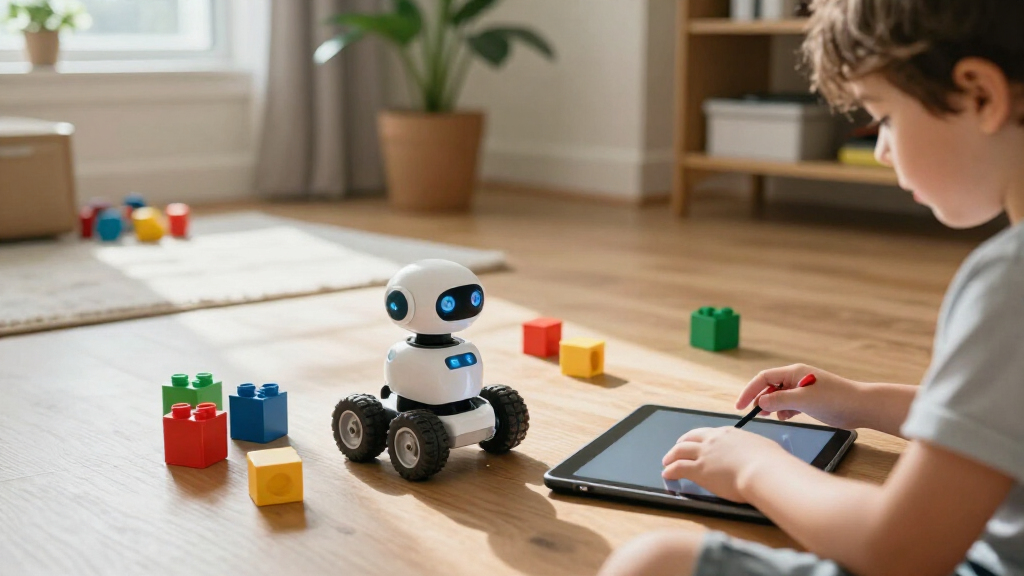
I compared these 15 educational coding robots by the learning experience they offer, not by feature count alone. The main criteria were the clarity of the first coding steps, age and skill fit, the balance of play and instruction, opportunities to progress, and how much setup or adult involvement a family may need. I also looked at whether a product teaches screen-free sequencing, app-based block coding, robot construction, or more technical programming, since those approaches suit different children.
The ranking gives the strongest placement to options with a useful mix of accessibility, learning value, and room to advance. Screen-free picks rank well for younger beginners, but they do not outrank more versatile robots when the goal is sustained coding practice. Build kits and Arduino-style options can offer richer technical exploration, yet their assembly demands and steeper learning curve make them less suitable as first robots. Where products share a brand or similar name, I treat them as separate choices and recommend checking the exact kit contents.
Factors to Consider When Choosing Educational Coding Robots For Kids
Before choosing a robot, decide what kind of learning you want it to prompt. A child who enjoys following a maze may thrive with screen-free commands, while a tinkerer may prefer building a robot and changing how it behaves. These broader choices can prevent a common mismatch: buying a technically ambitious kit for a child who wants immediate play, or a simple toy for a learner already asking how sensors and code work.
Match the Coding Method to the Child
Screen-free coding uses physical commands, cards, or drawn paths to teach order, direction, and debugging without making a tablet part of the activity. App-based block coding adds concepts such as loops, events, and conditionals in a visual format, while text-based or Arduino-oriented work introduces a more technical layer. A common mistake is to choose by the word “coding” on the box without checking how the child will actually give the robot instructions. Start with the method that feels inviting, then look for a clear next step if the child sticks with it. A younger beginner may benefit more from repeated sequencing play than from a larger feature set they cannot yet access.
Separate Age Guidance From Readiness
Age labels are useful starting points, but they do not capture a child’s patience, reading comfort, fine-motor skills, or appetite for troubleshooting. A child who likes following multi-step directions may be ready for a construction kit earlier than a peer who prefers open-ended play. Check whether instructions require independent reading, an app setup, or adult help with small parts. If siblings will share one robot, choose for the younger child’s safe and engaging entry point, then confirm that the older child has meaningful extensions. This avoids buying a kit that is technically age-appropriate but frustrating in everyday use.
Decide Whether Building Is Part of the Goal
Some robots arrive ready to use, while others make assembly a major part of the activity. Building can teach mechanical relationships and make the final robot feel earned, but it also adds time before the first coding lesson. Families who want quick, repeatable activities may prefer a ready-to-run robot; young engineers may welcome a kit that turns construction into the lesson. Do not assume that a longer assembly automatically means stronger coding instruction. Check whether the kit includes guided programming tasks after construction, since otherwise the child may spend most of the session assembling rather than learning to code.
Think About Screens, Devices, and Setup
App-based robots can offer visual programming and a wider range of activities, but they depend on a compatible device and can add setup steps. Screen-free options sidestep that requirement, though their command systems may cover fewer advanced concepts. Before buying, verify device compatibility and whether the core activities work without a separate account or ongoing app access. Also consider where the robot will be used: a small maze activity needs less open floor space than a driving robot that moves around a room. Choosing around the family’s actual devices and play area can matter more than picking the robot with the longest feature list.
Look for a Learning Path, Not Just More Features
A robot can have lights, sounds, sensors, and movement without teaching a child how to build a program. Look for activities that ask the learner to predict an outcome, test instructions, find an error, and revise the code. Those cycles make coding concepts tangible and help prevent play from becoming a sequence of novelty tricks. For a first robot, a small set of well-scaffolded challenges may be more useful than many modes with little guidance. For a returning learner, prioritize a path into new concepts such as loops, conditions, or sensor responses rather than simply adding more accessories.
Budget for Adult Support and Ongoing Use
The amount of adult involvement can shape whether a robot becomes a regular activity or stays in its box. Younger children may need help reading instructions, setting up an app, or resetting a challenge, while older children may prefer to experiment independently. A more technical kit can be rewarding when an adult is available to troubleshoot, but it may be a poor fit for a family seeking self-guided play. Consider how often the child is likely to return to the robot and whether the activities support fresh challenges after the first session. A simpler product used repeatedly can teach more than an ambitious kit that rarely gets assembled.
Frequently Asked Questions
Which type of coding robot is best for a child who has never coded?
For a first experience, prioritize clear cause and effect over a long list of functions. Screen-free options such as Botley or the Robot Mouse set let children practice sequencing and correcting a route without needing to learn an app at the same time. If the child is comfortable using a tablet, Dash offers a path into visual coding activities. Choose based on whether they enjoy physical puzzles or digital experimentation, and check that the first activities can be completed with little setup.
Should I choose a screen-free robot or an app-based one?
Choose screen-free play when the goal is to introduce command order and problem-solving without adding device time or app setup. App-based robots are a better fit when a child is ready to work with visual programming blocks and wants to explore more varied instructions. Neither approach is automatically more educational; the value depends on whether the child can progress from trying commands to planning and debugging them. If you are unsure, consider the child’s current comfort with tablets and whether an adult can help with initial setup.
Is a robot-building kit a good first coding toy?
It can be, but only if the child enjoys construction and has the patience for a longer start. Building kits add useful mechanical learning, yet assembly can delay the first coding activity and may call for adult help. For a child eager to make a robot move right away, a ready-to-use model is usually a smoother introduction. If you choose a kit, check that it includes guided coding tasks as well as assembly instructions, so the learning continues after the robot is built.
What should I check before buying an app-based coding robot?
Confirm that the app supports the family’s device and operating system, then check whether the robot’s main learning activities depend on the app. Look at the setup steps, connection method, and whether a child can return to activities without repeated adult assistance. It is also useful to check how the coding interface grows in complexity, since a beginner-friendly start is less useful if the child quickly runs out of new challenges. These details can make a bigger difference to regular use than a long list of advertised modes.
How do I choose between Botley, Dash, and Codey Rocky?
Choose Botley for screen-free command practice and a straightforward introduction to sequencing. Dash is a stronger fit if you want app-based activities that can support a broader coding journey without asking the child to assemble the robot. Codey Rocky suits families looking for an interactive coding robot that moves beyond basic command play. The key distinction is not which one has the most features, but whether the child is ready for a screen, wants immediate hands-on commands, or is motivated by a more involved coding experience.
Conclusion
For most families, I recommend Dash as the best overall because it pairs an accessible start with app-based coding activities that can support continued learning. For best value and a first screen-free experience, I would look at Botley 2.0, while Botley or the Robot Mouse set makes the most sense for beginners who want simple sequencing puzzles. For a more involved coding path, Codey Rocky is my premium-style pick; technically inclined older learners who want to build and experiment can look to the mBot kits or ELEGOO car kit, with adult support as needed. Pick the robot whose coding method, setup demands, and level of challenge fit the child today—then favor the option that gives them a clear reason to keep experimenting.