Programmable graphing calculators range from familiar, button-driven school models to advanced color devices with Python or computer algebra. For most students, I’d start with the TI-84 Plus CE for its established graphing workflow and color screen; the Casio fx-9750GIII stands out for built-in Python, while the HP Prime G2 suits buyers who want a touch display and CAS tools. The main tradeoffs are programming flexibility, classroom compatibility, ease of use, and how much advanced math support you need. A calculator with more features is not automatically the better choice if your course restricts it or you won’t use those tools. Read on for how the 15 options compare and which buyers each one fits.

Prime made for students and young adults
- Fast, free delivery for dorm and study essentials
- Prime Video and Amazon Music included
- Member-only deals
Key Takeaways
Classroom familiarity favors the TI-84 line: the TI-84 Plus CE combines a color display with a widely recognized button-based workflow, while older TI-83 and TI-84 models keep the interface simpler.
Python support is not limited to one platform: the Casio fx-9750GIII and TI-84 Plus CE-T Python Edition offer coding-oriented options, so buyers should check which language and course materials they plan to use.
Advanced math tools separate the premium models: the TI-Nspire CX II CAS and HP Prime G2 add computer algebra capabilities, which can help with symbolic work but may be barred in some exams.
Model names can hide meaningful differences: the TI-Nspire CX II CAS and non-CAS versions are not interchangeable, and the two Casio color variants mainly differ in finish rather than core platform.
Not every graphing-labeled option fits a programming-first buyer: the CATIGA CS-121 and ROATEE detachable-notepad model require closer checks of software support, classroom acceptance, and programming capabilities before purchase.
| Texas Instruments TI-83 Plus Programmable Graphing Calculator |  | Best for a Straightforward Programming Setup | Brand: Texas Instruments | Model: TI-83 Plus | Calculator type: Graphing | VIEW LATEST PRICE | See Our Full Breakdown |
| Texas Instruments TI-84 Plus Programmable Graphing Calculator |  | Best for a Familiar Coursework Workhorse | Brand: Texas Instruments | Model: TI-84 Plus | Calculator type: Graphing | VIEW LATEST PRICE | See Our Full Breakdown |
| Casio fx-9750GIII Graphing Calculator with Python Programming, Pink |  | Best for Python Programming | Brand: Casio | Model: fx-9750GIII | Calculator type: Graphing | VIEW LATEST PRICE | See Our Full Breakdown |
| Texas Instruments TI-89 Titanium Programmable Graphing Calculator (Renewed) |  | Best for College Math and Engineering | Brand: Texas Instruments | Model: TI-89 Titanium | Calculator type: Graphing | VIEW LATEST PRICE | See Our Full Breakdown |
| Texas Instruments TI-Nspire CX II CAS Color Graphing Calculator with Student Software |  | Best Premium Color and CAS Option | Brand: Texas Instruments | Model: TI-Nspire CX II CAS | Calculator type: Graphing | VIEW LATEST PRICE | See Our Full Breakdown |
| Texas Instruments TI-Nspire CX II Color Graphing Calculator with Student Software |  | Best for Visual, Document-Based Math | Display: 3.5-inch color LCD | Power: Rechargeable battery; included | Software license: Four years | VIEW LATEST PRICE | See Our Full Breakdown |
| Texas Instruments TI-84 Evo Graphing Calculator, White |  | Best for Built-In Python and Classroom Use | Screen: 2.8 inches | Processor: Described as three times faster | Graphing space: 50% more than previous design | VIEW LATEST PRICE | See Our Full Breakdown |
| Texas Instruments TI-83 Plus Programmable Graphing Calculator with 10-Digit LCD |  | Best for Straightforward, Battery-Powered Coursework | Display: 10-digit LCD | Screen size: 1.5 cm, as listed | Power: Four AAA batteries required | VIEW LATEST PRICE | See Our Full Breakdown |
| Texas Instruments TI-83 Plus Programmable Graphing Calculator with 10-Digit LCD |  | Best for Split-Screen Data and Equation Work | Display: 10-digit LCD | Screen size: 70.5 inches, as listed; likely inaccurate | Power: One 12V battery, as listed | VIEW LATEST PRICE | See Our Full Breakdown |
| Casio fx-9750GIII Graphing Calculator with Python Programming, White |  | Best Value for Python and Broad Math Functions | Display: LCD, listed as 7.2 inches | Programming: MicroPython | Memory: 3 MB flash memory | VIEW LATEST PRICE | See Our Full Breakdown |
| Texas Instruments TI-84 Plus CE Color Graphing Calculator, Black |  | Best Overall for Coursework | Model: TI-84 Plus CE | Display: 2.8-inch LCD | Calculator type: Graphing | VIEW LATEST PRICE | See Our Full Breakdown |
| CATIGA CS-121 Scientific Graphing Calculator |  | Best Compact Budget Alternative | Model: CS-121 | Calculator type: Scientific, graphing, and engineering | Display: 3-inch LCD | VIEW LATEST PRICE | See Our Full Breakdown |
| Texas Instruments TI-84 Plus CE-T Python Edition Graphing Calculator, Black | 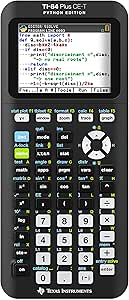 | Best for Python Learning | Model: TI-84 Plus CE-T Python Edition | Display: 2.8-inch color, backlit | Resolution: 320 × 240 pixels | VIEW LATEST PRICE | See Our Full Breakdown |
| HP Prime G2 Graphing Calculator with CAS and Multi-Touch Color Display |  | Best Premium CAS Calculator | Model: HP Prime G2 | Calculator type: Graphing | Display: 3.5-inch color LCD with multi-touch | VIEW LATEST PRICE | See Our Full Breakdown |
| ROATEE Rechargeable Graphing Scientific Calculator with Detachable LCD Notepad |  | Best for Working Through Problems by Hand | Model: AC0502-U-5D-1002 | Calculator functions: Complex, base, matrix, vector, table, statistics, equations, graphing, permutations and combinations, regression analysis, calculus, and function solving | Writing pad: Detachable LCD with stylus; attaches to either side | VIEW LATEST PRICE | See Our Full Breakdown |
| programmable graphing calculator | Display | Model | Power | Calculator type |
|---|---|---|---|---|
| Texas Instruments TI-83 Plus P | LCD, 3.2 inches | TI-83 Plus | — | Graphing |
| Texas Instruments TI-84 Plus P | 10-digit LCD | TI-84 Plus | — | Graphing |
| Casio fx-9750GIII Graphing Cal | LCD with Natural Textbook Display | fx-9750GIII | Battery powered; requires 4 AAA batteries | Graphing |
| Texas Instruments TI-89 Titani | LCD, 100 × 160 pixels; 2.8 inches | TI-89 Titanium | Battery powered; requires 4 AAA batteries | Graphing |
| Texas Instruments TI-Nspire CX | 16-bit color LCD, 320 × 240 pixels | TI-Nspire CX II CAS | Rechargeable battery; up to two weeks per charge | Graphing |
| Texas Instruments TI-Nspire CX | 3.5-inch color LCD | — | Rechargeable battery; included | — |
| Texas Instruments TI-84 Evo Gr | — | — | — | — |
| Texas Instruments TI-83 Plus P | 10-digit LCD | — | Four AAA batteries required | — |
| Texas Instruments TI-83 Plus P | 10-digit LCD | — | One 12V battery, as listed | — |
| Casio fx-9750GIII Graphing Cal | LCD, listed as 7.2 inches | — | Four AAA batteries, included | — |
| Texas Instruments TI-84 Plus C | 2.8-inch LCD | TI-84 Plus CE | Rechargeable battery | Graphing |
| CATIGA CS-121 Scientific Graph | 3-inch LCD | CS-121 | One LR44 battery, included | Scientific, graphing, and engineering |
| Texas Instruments TI-84 Plus C | 2.8-inch color, backlit | TI-84 Plus CE-T Python Edition | — | — |
| HP Prime G2 Graphing Calculato | 3.5-inch color LCD with multi-touch | HP Prime G2 | Rechargeable lithium-ion battery | Graphing |
| ROATEE Rechargeable Graphing S | Up to 100-character input; full-screen graphing and adjustable contrast | AC0502-U-5D-1002 | — | — |
More Details on Our Top Picks
Texas Instruments TI-83 Plus Programmable Graphing Calculator
The TI-83 Plus is a practical pick for students who want programmable graphing without moving to a more elaborate interface. Its battery-powered design and 3.2-inch LCD keep the core experience focused on calculator-based work. Compared with the TI-84 Plus, the supplied details do not list flash software or a 10-digit display, so I would favor the TI-84 Plus if those specific features matter to your coursework. The TI-83 Plus instead makes sense when you want a basic programmable graphing model and do not need the color screen or rechargeable battery of the TI-Nspire CX II CAS. The tradeoffs are its older, modest display specification and reliance on a CR123A battery; check battery availability before choosing it for regular use.
Pros:- Programmable graphing functionality for math coursework
- Battery-powered operation does not depend on regular charging
- 3.2-inch LCD provides a specified screen size
- Compact listed dimensions of 7.25 × 3.25 inches
Cons:- Requires a CR123A battery, which differs from the AAA batteries used by several alternatives
- The supplied specifications do not identify software, memory, or connectivity details
- LCD specification is less feature-rich than the color display on the TI-Nspire CX II CAS
Best for: Students seeking a basic programmable graphing calculator for coursework who prefer a simple, battery-powered model.
Not ideal for: Buyers who want a color display, rechargeable power, or a listed software package; the TI-Nspire CX II CAS offers a more feature-rich setup.
- Brand:Texas Instruments
- Model:TI-83 Plus
- Calculator type:Graphing
- Display:LCD, 3.2 inches
- Power source:Battery powered
- Required battery:1 CR123A
- Enclosure:Plastic
- Dimensions:7.25 × 3.25 inches (L × W)
- Weight:10.4 ounces
Our verdict“Choose the TI-83 Plus for straightforward programmable graphing, but pick the TI-84 Plus or TI-Nspire CX II CAS if their additional listed features better match your needs.”
Texas Instruments TI-84 Plus Programmable Graphing Calculator
The TI-84 Plus earns this role by pairing programmable graphing with flash software and a stated 10-digit LCD, giving buyers more defined capabilities than the TI-83 Plus listing provides. That makes it a stronger fit for students who want a conventional graphing calculator with software support, but its display remains monochrome rather than the color screen found on the TI-Nspire CX II CAS. The TI-Nspire also includes student software and a rechargeable battery, so it suits buyers who want a more connected setup. The TI-84 Plus is the simpler alternative, though the supplied details do not specify battery type, screen size, or connectivity. Its plastic enclosure is another practical tradeoff rather than a premium-build feature.
Pros:- Programmable graphing functionality
- Flash software is included
- 10-digit LCD display is specified
- Battery-powered design avoids dependence on a rechargeable battery
Cons:- Plastic enclosure offers no premium material advantage
- The supplied product details do not state battery type or battery life
- Monochrome LCD lacks the color graphing options listed for the TI-Nspire CX II CAS
Best for: Students who want programmable graphing with flash software and a familiar 10-digit LCD for regular math coursework.
Not ideal for: Buyers who need a color display, rechargeable battery, or clearly specified computer connectivity; the TI-Nspire CX II CAS lists those features.
- Brand:Texas Instruments
- Model:TI-84 Plus
- Calculator type:Graphing
- Programming:Programmable functionality
- Display:10-digit LCD
- Software:Flash software included
- Power source:Battery powered
- Enclosure:Black plastic
Our verdict“Pick the TI-84 Plus if flash software and a 10-digit LCD matter more than color, rechargeable power, or detailed connectivity features.”
Casio fx-9750GIII Graphing Calculator with Python Programming, Pink
The Casio fx-9750GIII is the clearest choice here for buyers who want a programming language explicitly named in the specifications: it runs MicroPython on the calculator itself. Its natural textbook display can show expressions in a familiar written format, while USB supports moving programs and files to a computer. The listed mix of graphing, vectors, probability distributions, and spreadsheet functions also gives it wider math and science coverage than the more basic TI-83 Plus details establish. Unlike the TI-Nspire CX II CAS, though, this model has a monochrome LCD and uses four AAA batteries rather than a rechargeable pack. The pink finish is a personal-style distinction, not a functional advantage; choose the white fx-9750GIII alternative if you prefer a less vivid color.
Pros:- Runs MicroPython directly on the calculator
- Natural textbook display presents expressions in a familiar format
- USB supports transferring programs and files to a computer
- Includes graphing, vectors, probability distributions, and spreadsheet functions
Cons:- Requires four AAA batteries
- LCD does not provide the color graphing options listed for the TI-Nspire CX II CAS
- Plastic enclosure is a functional rather than premium build
Best for: Students and hobbyist programmers who want on-device MicroPython, USB file transfers, and broad math and science functions.
Not ideal for: Buyers who prioritize a color screen or rechargeable power; the TI-Nspire CX II CAS offers both, while this Casio uses four AAA batteries.
- Brand:Casio
- Model:fx-9750GIII
- Calculator type:Graphing
- Display:LCD with Natural Textbook Display
- Programming:MicroPython
- Connectivity:USB
- Flash memory:3 MB
- Power:Battery powered; requires 4 AAA batteries
- Exam approval:AP, SAT, ACT, and IB
Our verdict“Choose the fx-9750GIII if on-device MicroPython and broad math functions matter more than color display or rechargeable power.”
Texas Instruments TI-89 Titanium Programmable Graphing Calculator (Renewed)
The TI-89 Titanium is aimed at students who need more than graph plotting: its 16 preloaded applications, equation formatting, and folder-based memory management suit college math and engineering workflows. Pretty Print can show stacked fractions, radicals, and superscripts in familiar notation, which may make complex expressions easier to inspect than on the TI-83 Plus. Select sensor and data-collection compatibility adds another use case, though it is limited to specified systems. This is a renewed unit, so its 90-day limited warranty is shorter than the one-year warranty listed for the Casio fx-9750GIII. The supplied dimensions and 0.27 g weight also appear unusual for a handheld calculator; buyers should verify those details before relying on them for fit or portability.
Pros:- Includes 16 applications for college math and engineering coursework
- Pretty Print displays radicals, stacked fractions, and superscripts
- Split-screen views and folder-based memory organization support structured work
- Works with select data-collection systems and sensors
Cons:- Renewed condition comes with a 90-day limited warranty
- Requires four AAA batteries
- Sensor compatibility is limited to specified systems, and the listed dimensions and weight warrant verification
Best for: College math and engineering students who want preloaded applications, formatted equations, and compatible sensor-based data collection.
Not ideal for: Buyers who want a new unit, a longer listed warranty, or a color display; the renewed TI-89 has a 90-day limited warranty and a 100 × 160-pixel LCD.
- Brand:Texas Instruments
- Model:TI-89 Titanium
- Calculator type:Graphing
- Display:LCD, 100 × 160 pixels; 2.8 inches
- Preloaded applications:16
- Power:Battery powered; requires 4 AAA batteries
- Enclosure material:Titanium
- Condition:Renewed; professionally inspected and tested
- Warranty:90-day limited
Our verdict“Choose the renewed TI-89 Titanium for its college-level applications and formatted math tools if its shorter warranty and monochrome screen suit your needs.”
Texas Instruments TI-Nspire CX II CAS Color Graphing Calculator with Student Software
The TI-Nspire CX II CAS is the most feature-rich option in this group for buyers who want color graphing, computer algebra, and a linked computer workflow. Its 320 × 240 color display, six graph styles, and 15 graph colors make visual comparisons easier to distinguish than on the monochrome TI-84 Plus or TI-83 Plus. The included student software and four-year license also connect calculator work with a laptop, while the rechargeable battery is listed for up to two weeks per charge. That breadth comes with a tradeoff: this is a more software-centered choice than the Casio fx-9750GIII, which explicitly supports MicroPython and USB file transfers. Exam approval is limited to select AP and IB programs, so students should check rules for their specific exam.
Pros:- CAS supports exploring math and science concepts
- 16-bit color display with six graph styles and 15 colors
- Rechargeable battery is listed for up to two weeks per charge
- Includes student software with a four-year license
Cons:- Computer software compatibility is specified for PC and Mac, with other platforms not identified
- Exam approval applies only to select AP and IB Diploma Programme exams
- Does not list on-device Python programming like the Casio fx-9750GIII
Best for: Students who want CAS, a color graphing screen, rechargeable power, and included software for laptop-based math work.
Not ideal for: Python-focused programmers or students whose exam rules do not permit this model; the Casio fx-9750GIII explicitly runs MicroPython, and approval here is limited to select AP and IB exams.
- Brand:Texas Instruments
- Model:TI-Nspire CX II CAS
- Calculator type:Graphing
- Display:16-bit color LCD, 320 × 240 pixels
- Screen size:3.5 inches
- Power:Rechargeable battery; up to two weeks per charge
- Included software:TI-Nspire CX Student Software
- Software license:4 years
- Graph styles and colors:6 styles; 15 colors
Our verdict“Choose the TI-Nspire CX II CAS if color, CAS, and included computer software are your priorities, after checking the rules for your exams.”
Texas Instruments TI-Nspire CX II Color Graphing Calculator with Student Software
The TI-Nspire CX II is the strongest fit here for students who want to connect graphs, calculations, and saved work in one device. Its high-resolution color display supports multiple visualizations, while document sharing with a calculator, computer, or iPad makes it easier to continue coursework across devices. Compared with the TI-84 Evo, this model puts more emphasis on visual exploration and document workflows than on the newer model’s built-in Python and USB-C charging. A four-year computer software license adds a useful desktop companion, and the rechargeable battery suits regular school use without disposable cells. The tradeoff is that its sharing details name several devices while the compatibility spec lists laptops; its dimensions are also incomplete. Buyers should check their school’s workflow and exam rules before choosing it.
Pros:- High-resolution color display supports multiple visualizations.
- Rechargeable battery supports portable use without internet access.
- Documents can be saved and shared with a calculator, computer, or iPad.
- Includes a four-year computer software license.
Cons:- Listed compatible devices specify laptops, despite broader document-sharing claims.
- Provided dimensions are incomplete and may not describe the full calculator.
- Does not list built-in Python programming.
Best for: Students who regularly work with multiple visualizations and want to save and share math documents between a calculator and computer.
Not ideal for: Buyers prioritizing built-in Python programming, USB-C charging, or clearly specified device compatibility; the TI-84 Evo better matches those needs.
- Display:3.5-inch color LCD
- Power:Rechargeable battery; included
- Software license:Four years
- Document sharing:Calculator, computer, or iPad
- Exam compatibility:PSAT/NMSQT, SAT, ACT, AP, and IB Diploma Programme
- Weight:9.28 ounces
- Warranty:One-year limited manufacturer warranty
Our verdict“Choose the TI-Nspire CX II if visual math and document sharing matter more to you than Python programming or USB-C charging.”
Texas Instruments TI-84 Evo Graphing Calculator, White
The TI-84 Evo is the most programming-forward classroom pick in this group, pairing built-in Python with a faster processor and an icon-based home screen. Its advertised 50% increase in graphing space over the previous design gives students more room to read patterns, though the 2.8-inch screen still limits how much detail fits at once. Compared with the TI-Nspire CX II, the Evo offers a simpler, more familiar calculator workflow and Python on the device, while the Nspire puts more weight on color visualizations and document sharing. USB-C charging and a rechargeable battery reduce dependence on replaceable cells, and the four-year online calculator subscription adds a computer-based option. The compromises are a small screen and the need to keep the battery charged; this is less compelling for buyers who want a larger visual workspace.
Pros:- Built-in Python programming supports coding on the calculator.
- Processor is described as three times faster, with 50% more graphing space than the previous design.
- USB-C charging and a rechargeable battery avoid routine AAA replacement.
- Four-year TI-84 Evo online calculator subscription is included.
Cons:- The 2.8-inch screen may feel cramped for detailed graphs.
- Rechargeable battery needs periodic charging.
- Its graphing-space claim is relative to the previous design, not a guarantee of a large display.
Best for: Students taking algebra through calculus or statistics who want Python programming, a classroom-oriented interface, and rechargeable USB-C power.
Not ideal for: Learners who need a large display for detailed graphs or prefer document-centered visual work like the TI-Nspire CX II.
- Screen:2.8 inches
- Processor:Described as three times faster
- Graphing space:50% more than previous design
- Programming:Built-in Python
- Power and charging:Rechargeable battery; USB-C
- Included subscription:Four-year TI-84 Evo online calculator subscription
- Exam compatibility:ACT, SAT, PSAT/NMSQT, IB Diploma Programme, and AP course exams
- Weight:7.2 ounces
Our verdict“Pick the TI-84 Evo if you want built-in Python and modern charging in a classroom calculator, and can work comfortably on a compact screen.”
Texas Instruments TI-83 Plus Programmable Graphing Calculator with 10-Digit LCD
The TI-83 Plus is a practical choice for core algebra work when the priority is graphing and data analysis rather than a modern color interface. It can compare functions, plot data, and analyze results, with horizontal and vertical split-screen modes that let students view related information together. Finance tools and an I/O port extend its usefulness beyond classroom graphing. Compared with the Casio fx-9750GIII, this TI model lacks the listed MicroPython support and USB file transfers, but its split-screen tools and TI-device communication may suit students already working with compatible TI products. Its main tradeoff is basic hardware: the display is a 10-digit LCD, not a color screen, and it requires four AAA batteries. I’d choose it for established coursework and skip it if programming or richer visual feedback is a priority.
Pros:- Graphs and compares functions and supports data plotting and analysis.
- Horizontal and vertical split-screen options support side-by-side math work.
- Finance tools add utility for financial calculations.
- I/O port supports communication with other TI products.
Cons:- Requires four AAA batteries.
- 10-digit LCD lacks the color and visual detail of newer graphing models.
- No programming language is specified in the supplied product details.
Best for: Algebra and math students who need function graphing, data analysis, split-screen views, and compatibility with other TI products.
Not ideal for: Students seeking built-in Python, USB file transfer, or a color display; the Casio fx-9750GIII lists more programming and connectivity features.
- Display:10-digit LCD
- Screen size:1.5 cm, as listed
- Power:Four AAA batteries required
- Graphing functions:Function graphing and comparison; data plotting and analysis
- Viewing modes:Horizontal and vertical split-screen
- Connectivity:I/O port for communication with other TI products
- Weight:7.36 ounces
Our verdict“Choose this TI-83 Plus for dependable core graphing and split-screen coursework if you do not need Python or a color display.”
Texas Instruments TI-83 Plus Programmable Graphing Calculator with 10-Digit LCD
This TI-83 Plus suits students who want to keep a graph, table, or equation visible alongside another view. Its horizontal and vertical split-screen modes give it a useful workflow advantage over simpler graphing setups, while data plotting, statistical analysis, and regression tools cover common higher-level math tasks. Compared with the other TI-83 Plus listing in this roundup, the supplied details here call out regression tools and a 12V battery rather than four AAA cells; that power specification is unusual enough that buyers should verify it before purchase. The I/O port and financial functions broaden its uses, but the listed 70.5-inch screen size appears unreliable and should not guide a decision. It is a functional legacy-style option, not a match for the Casio fx-9750GIII’s stated MicroPython and USB file-transfer support.
Pros:- Graphs and compares multiple functions.
- Split-screen modes can display graphs, tables, and equations together.
- Includes data plotting, statistical analysis, and regression tools.
- Financial functions and I/O connectivity support additional tasks.
Cons:- The listed 12V battery requirement is unusual and should be confirmed before buying.
- The stated 70.5-inch screen size appears inaccurate.
- No programming language or USB file transfer is listed, unlike the Casio fx-9750GIII.
Best for: Students who rely on split-screen graph, table, and equation views and need data analysis or regression tools on a traditional TI calculator.
Not ideal for: Buyers who want programming features, modern connectivity, or dependable screen and battery specifications; the listed 70.5-inch display figure needs verification.
- Display:10-digit LCD
- Screen size:70.5 inches, as listed; likely inaccurate
- Power:One 12V battery, as listed
- Connectivity:I/O port
- Graphing:Multiple-function graphing and comparison
- Analysis:Data plotting, statistical analysis, and regression
- Viewing modes:Horizontal and vertical split-screen
Our verdict“Choose this TI-83 Plus for split-screen analysis and regression work only after confirming its battery and screen specifications.”
Casio fx-9750GIII Graphing Calculator with Python Programming, White
The Casio fx-9750GIII brings MicroPython programming and a wide set of math tools to a straightforward exam-approved calculator. Its natural textbook display presents expressions in a familiar layout, while graphing, vectors, probability distributions, and spreadsheets make it useful across math and science coursework. Compared with the TI-84 Evo, it also offers Python programming but uses four AAA batteries rather than a rechargeable USB-C setup; the Evo’s stated processor and expanded graphing space may appeal more to students focused on speed and graph viewing. Casio adds USB file transfer and 3 MB of flash memory, though the product details do not describe a color display or rechargeable power. The plastic enclosure is plain, but the bigger tradeoff for some buyers is battery replacement rather than charging.
Pros:- Supports MicroPython programming and USB file transfers.
- Natural textbook display presents expressions in a familiar format.
- Includes graphing, vectors, probability distributions, and spreadsheet functions.
- Approved for AP, SAT, ACT, and IB exams.
Cons:- Requires four AAA batteries, although they are included.
- Plastic enclosure offers a basic build.
- Does not list a color display or rechargeable battery.
Best for: Math and science students who want MicroPython, broad subject tools, USB file transfers, and an exam-approved calculator powered by replaceable batteries.
Not ideal for: Students who prefer USB-C rechargeable power or want the TI-84 Evo’s newer interface and stated extra graphing space.
- Display:LCD, listed as 7.2 inches
- Programming:MicroPython
- Memory:3 MB flash memory
- Connectivity:USB
- Power:Four AAA batteries, included
- Dimensions:6.6 x 3.25 inches
- Exam compatibility:AP, SAT, ACT, and IB exams
- Warranty:One-year limited
Our verdict“Choose the fx-9750GIII if MicroPython and broad math functions matter more than rechargeable power or a color screen.”
Texas Instruments TI-84 Plus CE Color Graphing Calculator, Black
The TI-84 Plus CE is my balanced pick for students who need a familiar graphing calculator for math and science classes, with programming available through the TI-84 platform. Its color display helps separate graph traces, while MathPrint presents fractions and formulas in a format closer to classroom materials. Compared with the Python-enabled TI-84 Plus CE-T Python Edition, this model’s listed features do not include Python, so it is less suited to buyers whose main goal is learning that language. The tradeoff is a smaller 2.8-inch screen and plastic enclosure rather than the HP Prime G2’s larger metal-bodied design. For routine coursework, though, its rechargeable battery and light weight make it a practical middle ground.
Pros:- Color graphing helps distinguish multiple traces and plotted information.
- MathPrint displays fractions and formulas in textbook-style notation.
- Rechargeable battery is specified to last up to one month per charge.
- Lightweight body is convenient to carry between classes.
Cons:- The 2.8-inch display gives less room for detailed graphs than the HP Prime G2’s 3.5-inch screen.
- Plastic enclosure may be less rugged than the HP Prime G2’s metal construction.
- Listed features do not include Python programming or a CAS.
Best for: Middle- and high-school students who need color graphing, textbook-style math display, and a lightweight calculator for regular coursework.
Not ideal for: Students prioritizing Python practice or symbolic algebra; the CE-T Python Edition adds Python, while the HP Prime G2 offers CAS.
- Model:TI-84 Plus CE
- Display:2.8-inch LCD
- Calculator type:Graphing
- Power:Rechargeable battery
- Battery life:Up to one month per charge
- Weight:7.04 ounces
- Dimensions:7.57 x 3.4 inches
- Enclosure:Plastic
Our verdict“Choose the TI-84 Plus CE for familiar, color-based coursework graphing and skip it if Python or CAS is a priority.”
CATIGA CS-121 Scientific Graphing Calculator
The CATIGA CS-121 pairs scientific functions with graphing in a compact package, making it a lower-complexity alternative to the classroom-oriented TI-84 Plus CE. Its stated 360-plus functions cover topics such as algebra, trigonometry, calculus, and statistics, while the dual-view screen can show a graph and formula together for quick checking. That layout may help students follow a calculation without switching views, but the product data does not specify a programmable language, so I would not pick it as a first choice for coding practice. It also runs on an LR44 battery rather than using the TI-84 CE’s rechargeable setup. The light body, anti-drop housing, and included case suit students who want broad math tools without carrying a larger, more advanced model.
Pros:- Combines scientific and graphing functions in one compact device.
- More than 360 stated functions cover a broad range of math subjects.
- Dual-view display shows graphs and formulas together.
- Anti-drop housing and an included protective case support everyday carrying.
Cons:- Product information does not specify a programming language, limiting its fit for coding-focused buyers.
- Requires an LR44 battery, unlike the rechargeable TI-84 Plus CE.
- Plastic enclosure may feel less substantial than the HP Prime G2’s metal body.
Best for: High-school or college students who want a lightweight graphing and scientific calculator for coursework, plus a protective case for daily transport.
Not ideal for: Buyers seeking a clearly specified programming language, rechargeable power, or a more established programming platform like the TI-84 series.
- Model:CS-121
- Calculator type:Scientific, graphing, and engineering
- Display:3-inch LCD
- Functions:Over 360
- Power:One LR44 battery, included
- Weight:4.8 ounces
- Dimensions:7 x 3.3 inches
- Enclosure:Plastic
Our verdict“Pick the CS-121 for compact, broad-purpose math work, but choose a TI-84 model if programmable coursework is central.”
Texas Instruments TI-84 Plus CE-T Python Edition Graphing Calculator, Black
For buyers who want programming to be part of the calculator experience, the TI-84 Plus CE-T Python Edition is the clearest fit here: it pairs the familiar TI-84 graphing toolkit with Python support. That makes it more suitable for introductory coding work than the standard TI-84 Plus CE, whose listed features focus on graphing and MathPrint. The backlit 320 × 240 color display supports graph, table, and data viewing, while 3 MB of flash memory provides space for programs and stored files. The compromise is screen size: its 2.8-inch panel is smaller than the HP Prime G2’s 3.5-inch touchscreen, and the listed built-in battery needs recharging. I’d favor this model for students who want a TI-84-style workflow with coding, not those who need CAS symbolic algebra.
Pros:- Python programming support gives coding a direct place in graphing-calculator work.
- Backlit, 320 × 240 color display supports clear graph and table viewing.
- Graphing, statistics, matrices, probability, and financial tools cover varied coursework.
- Built-in rechargeable battery and lightweight design suit regular classroom use.
Cons:- The 2.8-inch display is relatively small for inspecting detailed graphs.
- Battery life depends on use, and the unit requires recharging.
- It does not list the HP Prime G2’s CAS capability.
Best for: Students learning Python alongside algebra, statistics, or science who want programming on a familiar TI-84-style graphing calculator.
Not ideal for: Buyers who need a large touch display or CAS symbolic math; the HP Prime G2 is better aligned with those priorities.
- Model:TI-84 Plus CE-T Python Edition
- Display:2.8-inch color, backlit
- Resolution:320 × 240 pixels
- Color depth:16 bit
- Memory:3 MB flash ROM
- Programming:Python
- Battery:Built-in rechargeable TI battery
- Weight:257 g
Our verdict“Choose the CE-T Python Edition when learning Python matters more than a larger screen or CAS.”
HP Prime G2 Graphing Calculator with CAS and Multi-Touch Color Display
The HP Prime G2 is the most advanced mathematical workspace in this group, pairing a Computer Algebra System with symbolic, graphical, and numerical views. CAS can manipulate expressions symbolically, a major distinction from the TI-84 Plus CE models, which are better suited to standard graphing and coursework workflows. Its 3.5-inch multi-touch color display gives more room for plots and supports pinch-to-zoom and sketching, while 256 MB of flash memory exceeds the listed storage on the TI-84 Plus CE-T Python Edition. That capability comes with a steeper learning curve, and its metal enclosure may add weight compared with simpler plastic calculators. I’d choose it for advanced math and dynamic exploration, but not for students who mainly need straightforward graphing or a simpler interface.
Pros:- CAS supports symbolic mathematics beyond standard graphing workflows.
- 3.5-inch multi-touch display offers more room for plots and interactive exploration.
- 256 MB of flash memory supports substantial stored material.
- Metal enclosure and rechargeable battery suit a feature-rich portable calculator.
Cons:- Advanced tools and interface can take longer to learn than the TI-84 Plus CE.
- Wireless classroom control and projection require optional accessories.
- Metal construction may make it heavier than simpler plastic graphing calculators.
Best for: Advanced high-school and college students, educators, and mathematically confident users who need CAS, dynamic graphing, and a larger touch display.
Not ideal for: Beginners who want a simpler interface or students whose coursework only requires standard graphing and a basic programming workflow.
- Model:HP Prime G2
- Calculator type:Graphing
- Display:3.5-inch color LCD with multi-touch
- Computer Algebra System:CAS
- Memory:256 MB flash
- Power:Rechargeable lithium-ion battery
- Enclosure:Metal
- Dimensions:7.25 x 3.66 inches
Our verdict“Choose the HP Prime G2 for CAS and interactive advanced math, and skip it if standard graphing is all your coursework requires.”
ROATEE Rechargeable Graphing Scientific Calculator with Detachable LCD Notepad
The ROATEE graphing calculator stands apart by adding a detachable LCD notepad and stylus, giving students a place to work through steps beside the calculator rather than on separate paper. The pad attaches to either side, which gives left-handed users more flexibility than the fixed-screen layouts of the TI-84 Plus CE and HP Prime G2. Its stated tools include graphing, matrices, vectors, statistics, calculus, and equation solving, but the product data does not identify a programming language. That makes it less convincing as a programmable-calculator choice than the Python-enabled TI-84 Plus CE-T. The independent USB-C charging for calculator and pad is convenient for modular use, though it also means two devices need charging. I’d shortlist it for handwritten problem-solving, not for buyers who prioritize established programming ecosystems.
Pros:- Detachable LCD notepad and stylus support handwritten working beside calculations.
- Writing pad can attach to either side for left- or right-handed use.
- Lists graphing, matrix, vector, statistics, calculus, and equation-solving functions.
- Calculator and notepad charge separately via USB Type-C.
Cons:- Product information does not specify a programming language.
- Calculator and writing pad need separate charging.
- The writing area requires unlocking the LOCK key before use.
Best for: Students who regularly write out equations and want a detachable, repositionable note surface integrated with a graphing calculator.
Not ideal for: Programming-focused students who need a named coding language or a well-established ecosystem like the TI-84 Python Edition.
- Model:AC0502-U-5D-1002
- Calculator functions:Complex, base, matrix, vector, table, statistics, equations, graphing, permutations and combinations, regression analysis, calculus, and function solving
- Writing pad:Detachable LCD with stylus; attaches to either side
- Charging:USB Type-C; calculator and writing pad charge independently
- Display:Up to 100-character input; full-screen graphing and adjustable contrast
- Calculation history:Up to 200 bytes
- Variable storage:Up to 8 variables
- Dimensions and weight:17.7 × 8.5 × 1.9 cm; 146 g
Our verdict“Choose ROATEE if an integrated writing pad matters more than a clearly specified programming platform.”

How We Picked
I ranked these programmable graphing calculators by how well they balance usable programming features with everyday graphing and coursework. I gave more weight to clear programming support, dependable access to core graphing functions, and an interface students can learn without excess friction. Display quality, power approach, included software, and the breadth of math tools also shaped each position, but extra features only counted when they offered a practical benefit.
Classroom fit and buyer tradeoffs mattered as much as raw capability. The TI-84 family earns strong placement for its familiar workflow, while Casio’s Python-capable fx-9750GIII stands out for buyers prioritizing coding access. CAS and touch features lift the TI-Nspire CX II CAS and HP Prime G2 for advanced work, but their exam restrictions and learning curve narrow their audience. Older, renewed, duplicate, or less-established options rank lower when buyers should verify condition, compatibility, or programming support before relying on them.
| programmable graphing calculator | Calculator type |
|---|---|
| Texas Instruments TI-83 Plus P | Graphing |
| Texas Instruments TI-84 Plus P | Graphing |
| Casio fx-9750GIII Graphing Cal | Graphing |
| Texas Instruments TI-89 Titani | Graphing |
| Texas Instruments TI-Nspire CX | Graphing |
| Texas Instruments TI-Nspire CX | — |
| Texas Instruments TI-84 Evo Gr | — |
| Texas Instruments TI-83 Plus P | — |
| Texas Instruments TI-83 Plus P | — |
| Casio fx-9750GIII Graphing Cal | — |
| Texas Instruments TI-84 Plus C | Graphing |
| CATIGA CS-121 Scientific Graph | Scientific, graphing, and engineering |
| Texas Instruments TI-84 Plus C | — |
| HP Prime G2 Graphing Calculato | Graphing |
| ROATEE Rechargeable Graphing S | — |
Factors to Consider When Choosing Programmable Graphing Calculators
Before choosing a model, I’d work backward from the classes and tasks it must support. A graphing calculator can be powerful on paper yet a poor fit if a teacher prohibits CAS, the course uses a different interface, or its programming tools do not match your goals.
Match the Calculator to Your Course Rules
Start with the course syllabus, instructor guidance, and exam rules rather than a feature list. Some exams restrict calculators with computer algebra systems, wireless functions, or particular memory capabilities, even when those tools are useful for homework. A model accepted in one class may not be accepted in another, so check the exact model designation, not just the brand. This matters especially when comparing CAS and non-CAS versions of the same calculator family. If the calculator is for multiple years of study, check rules for upcoming courses too. Choosing a permitted device first can prevent a costly second purchase.
Choose Programming Tools You Will Actually Learn
“Programmable” can mean very different things: a calculator may support a built-in language, user-written programs, or limited customization. Decide whether you want to study Python, automate repeated calculations, or run programs provided by a class. Then check which language the calculator uses and whether your learning resources support it. A Python label alone does not tell you how the calculator handles libraries, editing, or program transfer. Buyers new to coding may benefit more from clear documentation and a manageable editor than from the broadest feature set. Avoid choosing on the language name alone if your real goal is smoother coursework.
Treat CAS as a Course-Specific Upgrade
Computer algebra systems can manipulate expressions symbolically, solve equations, and support more advanced math work. Those abilities can save time during study, but they may be restricted on tests and can change how you practice showing work. A CAS model makes the most sense when your courses permit it and you expect to use symbolic tools regularly. If you mainly need numerical graphing and standard functions, a non-CAS calculator may be easier to learn and more broadly accepted. Check whether your teacher expects exact answers, handwritten steps, or a particular calculator workflow. Paying for CAS capability is only useful when your academic setting allows it.
Compare Screen and Controls for Long Sessions
Color screens make multiple plots and visual distinctions easier to read, while a monochrome display can keep the interface focused and familiar. Touch controls may feel natural to some buyers, but button-based entry remains useful for repeated equations and exam conditions. Consider how often you will graph several functions, inspect tables, or move between menus. A large screen does not automatically make a calculator faster to operate if the navigation differs from your class materials. If you are replacing a school-issued model, a familiar keypad may reduce relearning. For independent study, a more visual interface may be worth the adjustment.
Check Compatibility Before Counting on Software
Included desktop software can make it easier to transfer work, manage files, or follow classroom demonstrations, but software access and compatibility can vary by operating system and license. Confirm whether your computer can run the software and whether a cable or separate accessory is needed. Also check how programs move between the calculator and computer; a convenient workflow matters when you regularly edit code. Do not assume that two calculators in the same brand family share identical file formats or classroom resources. If your teacher distributes programs, ask which models they support. These checks can matter more day to day than a small difference in screen specifications.
Weigh Age, Condition, and Long-Term Support
Older models can still suit courses built around their interface, but age may affect battery condition, software support, and access to replacement accessories. For a renewed unit, verify the seller’s condition details, included items, and return terms rather than assuming it matches a new device. A newer model can offer a fresher display or added programming features, but that does not guarantee it will be accepted in your course. Think about how long you need the calculator and whether classmates or instructors can help with its menus. If you are buying for a short course, familiarity may matter more than future-facing features. For longer use, support and compatibility deserve greater weight.
Frequently Asked Questions
Should I buy a CAS calculator if I am not sure whether my exams allow one?
I would wait until you confirm the rules for the specific exams and courses you plan to take. CAS tools can be useful for symbolic work, but some testing policies restrict them, and a calculator that is not allowed may be unusable when it matters most. Ask an instructor or check the official exam policy for the exact model, not just the product family. If the answer is uncertain, a non-CAS model is usually the safer school-focused choice. You can still use computer algebra software on a computer when your course permits it.
Is Python support enough reason to choose one graphing calculator over another?
Python support matters most if you plan to write or adapt programs on the calculator, rather than simply graph equations. Check how the calculator handles code entry, program storage, and moving files to a computer; these details affect whether you will use the feature regularly. Also compare the language and examples used in your class, since instruction for one platform may not transfer neatly to another. If programming is a secondary need, prioritize course compatibility and ease of graphing first. For a coding-focused purchase, confirm the exact Python capabilities before choosing.
Can I use a TI-83 Plus or TI-84 Plus for current coursework?
These established models can still cover many standard graphing and calculator tasks, especially in courses that use their familiar menus. Their age means they may lack newer display features or programming options found on current color and Python-focused models. The more important question is whether your teacher’s materials and exam rules support the exact model. Check condition and included accessories when buying an older or renewed unit, since a weak battery or missing cable can disrupt use. If you need current software workflows or newer features, compare a newer model before deciding.
How do I choose between the Casio fx-9750GIII and a TI-84 model?
Begin with the calculator used in your class: matching your teacher’s demonstrations and shared instructions can save time throughout the term. The Casio fx-9750GIII is a strong candidate when its Python support and graphing workflow match your goals. TI-84 models may be a more natural fit when your course materials are built around the TI interface. Compare the exact versions too, since color, Python support, and other capabilities vary across the lineup. If neither is required, try the menu structure or consult course-specific resources before choosing.
Is a nontraditional option like the CATIGA CS-121 or ROATEE a safe replacement for a school calculator?
I would not treat a graphing label as proof that a device will meet classroom needs. Before using either as a school replacement, confirm its programming functions, supported math features, and acceptance in your course or exam. Check whether the manufacturer provides usable documentation and software support, and whether the device can handle the tasks assigned by your teacher. A detachable notepad or a familiar-looking layout may be handy, but neither guarantees compatibility. If dependable class support is the priority, choose a model your instructor explicitly recognizes.
Conclusion
For most students, I’d choose the TI-84 Plus CE as the best overall when its interface and course acceptance fit; its color screen pairs familiar graphing with a practical school workflow. The Casio fx-9750GIII is my best value-oriented choice for Python-minded buyers, while the HP Prime G2 is the best premium pick for buyers who specifically want a touch display and CAS tools and have confirmed CAS is permitted. Beginners should favor the calculator their teacher uses, with a familiar TI-84-style workflow often reducing the learning curve. For advanced symbolic math, compare the TI-Nspire CX II CAS with the HP Prime G2; for Python, compare the Casio with the TI-84 Plus CE-T Python Edition. I’d choose older TI-83 or TI-84 models for course familiarity, not for the newest features, and buy the CATIGA or ROATEE only after confirming they meet the exact class requirements.