
The best robotics kits for kids pair hands-on building with activities a child can understand and repeat. I rank the Makeblock mBot as the best overall for its balance of coding and interactive robot play, while Thames & Kosmos Robotics: Smart Machines suits children who learn by building mechanisms, and the ELEGOO UNO R3 Smart Robot Car offers a more technical path for families ready for electronics and programming. The main tradeoff is whether to prioritize easy, guided projects or a deeper build that asks for more adult help. Kit formats also vary: some focus on one robot, while others offer many builds or emphasize electronics rather than programmable behavior. Read on for the full comparison and help matching a kit to your child’s age, patience, and interests.

Prime made for students and young adults
- Fast, free delivery for dorm and study essentials
- Prime Video and Amazon Music included
- Member-only deals
Key Takeaways
- The mBot is the strongest all-rounder in this lineup because it pairs a recognizable, interactive robot with coding activities; it is a more balanced choice than kits focused mainly on mechanical assembly.
- Smart Machines and My Robotic Pet serve different learning styles: the former emphasizes building working mechanisms, while the chameleon offers a more character-driven introduction to coding.
- The ELEGOO car and ACEBOTT arm are the more technical choices. They suit families seeking electronics and programmable movement, but may call for more patience and adult support than a guided beginner kit.
- Build-count claims do not equal lasting play value. Multi-build kits such as the Butterfly 40-in-1 and Sillbird 12-in-1 offer variety, but buyers should check whether projects meaningfully change the engineering challenge.
- Not every STEM kit is a robotics kit in the same sense: Snap Circuits and LEGO Gear Bots focus more on circuits or mechanisms, so they may be better fits for children who want those ideas before programming.
| Thames & Kosmos Robotics: Smart Machines – Robotics Coding Set |  | Best for Sensor-Based Coding | Brand: Thames & Kosmos | Recommended age: 8+ | Set name: Robotics: Smart Machines | VIEW LATEST PRICE | See Our Full Breakdown |
| ELEGOO UNO R3 Smart Robot Car Kit V4 with Camera |  | Best for Older Kids Ready for Arduino | Brand: ELEGOO | Model: US-EL-KIT-012 | Recommended age: 12 years and up | VIEW LATEST PRICE | See Our Full Breakdown |
| Smartivity Robotic Mechanical Hand STEM Toy (Ages 8-14) |  | Best Screen-Free Mechanical Build | Brand: Smartivity | Recommended age: 8–14 years | Build: Functional robotic mechanical hand | VIEW LATEST PRICE | See Our Full Breakdown |
| Butterfly EduFields 40-in-1 STEM Robotics Kit for Kids |  | Best for Project Variety | Brand: Butterfly EduFields | Age range: 8–17 years | Project count: 40+ | VIEW LATEST PRICE | See Our Full Breakdown |
| Makeblock mBot STEM Coding Robot Kit for Kids Ages 8-12 | 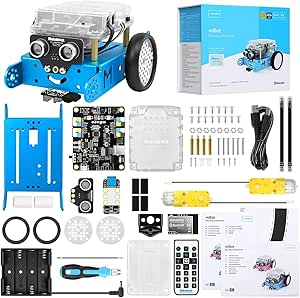 | Best Beginner Coding Robot | Brand: Makeblock | Model number: 90053 | Recommended age: 8+ years | VIEW LATEST PRICE | See Our Full Breakdown |
| BeAndge 6-in-1 Robotics STEM Kit for Kids Ages 8–12 |  | Best for Varied First Builds | Brand: BeAndge | Project count: 6-in-1 STEM kit | Included projects: Reptile robot, balance car, bubble machine, fiber lamp, buzzer wire game | VIEW LATEST PRICE | See Our Full Breakdown |
| Thames & Kosmos My Robotic Pet – Coding Chameleon |  | Best Screen-Free Coding Build | Brand: Thames & Kosmos | Model name: My Robotic Pet: Coding Chameleon | Model number: 620507 | VIEW LATEST PRICE | See Our Full Breakdown |
| ACEBOTT 4-in-1 Smart Robot Arm with 5DOF + Tank Car – STEM Coding Kit for Kids & Teens |  | Best for Advanced Coding and Robotics | Brand: ACEBOTT | Recommended age: 12+ years | Configurations: 4-in-1 modular kit | VIEW LATEST PRICE | See Our Full Breakdown |
| Sillbird 12-in-1 Solar Robot Building Kit STEM Gift for Boys Ages 8-13 |  | Best for Solar-Powered Building | Brand: Sillbird | Model number: US-SB-SolarRobot | Age range: 8–13 years | VIEW LATEST PRICE | See Our Full Breakdown |
| Sillbird 5-in-1 Programmable STEM Robot Building Kit, 488 Pieces |  | Best for Rechargeable App-and-Remote Play | Brand: Sillbird | Model: B883 | Recommended age: 8–16 years | VIEW LATEST PRICE | See Our Full Breakdown |
| Snap Circuits Explorer SC-100 STEM Electronics Kit – 100+ Projects, Ages 8+ |  | Best for Learning Circuit Basics | Age range: 8+ years | Electrical components: 28 | Included projects: 100+ | VIEW LATEST PRICE | See Our Full Breakdown |
| ANNISOKA DIY Robot Arm Kit for Kids and Teens – Wooden STEM Engineering Building Set |  | Best for Mechanical Assembly | Brand: ANNISOKA | Age range: 8 years and up | Material: Wood | VIEW LATEST PRICE | See Our Full Breakdown |
| Klutz LEGO Gear Bots Science STEM Activity Kit for Ages 8-12 |  | Best for Kinetic Builds | Age range: 8–12 years | LEGO elements: 62 | Included projects: 8 kinetic sculptures | VIEW LATEST PRICE | See Our Full Breakdown |
| Butterfly EduFields 10in1 STEM Electronics Robotics Kit for Kids Ages 8-12 |  | Best for Sensor-Based Robot Variety | Brand: Butterfly EduFields | Model number: 506 | Manufacturer part number: 506 | VIEW LATEST PRICE | See Our Full Breakdown |
| robotics kits for kid | Brand | Recommended age | Dimensions |
|---|---|---|---|
| Thames & Kosmos Robotics: Smar | Thames & Kosmos | 8+ | — |
| ELEGOO UNO R3 Smart Robot Car | ELEGOO | 12 years and up | 8 x 7 x 6 inches |
| Smartivity Robotic Mechanical | Smartivity | 8–14 years | 40.2 x 29 x 8.9 cm |
| Butterfly EduFields 40-in-1 ST | Butterfly EduFields | — | 8 x 5 x 1 inches |
| Makeblock mBot STEM Coding Rob | Makeblock | 8+ years | — |
| BeAndge 6-in-1 Robotics STEM K | BeAndge | 8–14 years | — |
| Thames & Kosmos My Robotic Pet | Thames & Kosmos | 8–12 years | — |
| ACEBOTT 4-in-1 Smart Robot Arm | ACEBOTT | 12+ years | — |
| Sillbird 12-in-1 Solar Robot B | Sillbird | 10+ years | 10.24 × 7.87 × 2.56 inches |
| Sillbird 5-in-1 Programmable S | Sillbird | 8–16 years | 6 × 7 × 8 inches |
| Snap Circuits Explorer SC-100 | — | — | — |
| ANNISOKA DIY Robot Arm Kit for | ANNISOKA | — | 6.8 x 4.48 x 4.3 inches |
| Klutz LEGO Gear Bots Science S | — | — | 10 x 1.5 x 10 inches |
| Butterfly EduFields 10in1 STEM | Butterfly EduFields | — | — |
More Details on Our Top Picks
Thames & Kosmos Robotics: Smart Machines – Robotics Coding Set
Eight motorized builds give this set more variety than the single-robot Makeblock mBot, while its visual app makes the first programming steps approachable for kids who are not ready to begin with Arduino. The ultrasonic sensor gives the models a way to detect obstacles, turning code into visible cause and effect rather than just remote control. A 64-page, full-color manual also ties assembly to STEM concepts. The tradeoff is that programming depends on a compatible iOS or Android phone or tablet, which is not included; older devices may also have Bluetooth trouble. Compared with the screen-free Smartivity Robotic Mechanical Hand, this kit offers more repeatable coding play, but less of a fully offline building experience.
Pros:- Eight motorized models offer several builds from one kit.
- Visual programming lowers the barrier to trying robot coding.
- Ultrasonic sensing lets builds respond to nearby obstacles.
- Full-color 64-page manual supports step-by-step assembly and STEM learning.
Cons:- A compatible smartphone or tablet is required and not included.
- Bluetooth may be unreliable with older devices.
- Some builds may be challenging for children below the recommended age.
Best for: Families with a compatible smartphone or tablet who want children aged 8 and up to build multiple sensor-equipped robots and start visual coding.
Not ideal for: Households without a compatible iOS or Android device, or younger children who need a simpler build with less assembly challenge.
- Brand:Thames & Kosmos
- Recommended age:8+
- Set name:Robotics: Smart Machines
- Models:8 motorized models
- Programming connection:Visual app via Bluetooth
- Sensor:Ultrasonic sensor
- Included components:Ultrasonic sensor, Bluetooth battery box, motors, gears, building blocks, and part separator tool
- Manual:64-page, full-color instruction manual
Our verdict“Choose Smart Machines if you want several app-programmed, sensor-based builds and already have a compatible mobile device.”
ELEGOO UNO R3 Smart Robot Car Kit V4 with Camera
The ELEGOO UNO R3 Smart Robot Car is the most electronics-and-code-focused pick here: kids assemble a car around a UNO R3 controller, then work with Arduino IDE examples rather than relying only on a visual coding app. Its camera with live FPV video, line tracking, and ultrasonic obstacle avoidance make it a stronger choice for a teen who wants to see how sensors and control work together. Compared with Makeblock mBot, it offers a camera and a more direct Arduino route, but demands more wiring and setup. The app and IR remote provide ways to operate the car, though neither removes the need to build it. At age 12 and up, it is less suited to younger first-time builders, and adult guidance may help with assembly and programming.
Pros:- UNO R3 and Arduino IDE support hands-on programming beyond app-only control.
- Camera and live FPV video add a distinctive way to observe the robot’s view.
- Line tracking and ultrasonic obstacle avoidance support sensor-based projects.
- App and IR remote give two control options, and a rechargeable battery is included.
Cons:- Assembly and programming make it a demanding choice for first-time builders.
- Recommended for ages 12 and up, so it is less appropriate for younger children than mBot.
- The camera-equipped car is a focused build rather than a kit of multiple robot models.
Best for: Kids aged 12 and up who are ready to assemble a robot car, follow wiring instructions, and begin programming with Arduino IDE.
Not ideal for: Younger children or beginners looking for a quick, low-setup coding robot; assembly and programming may call for adult help.
- Brand:ELEGOO
- Model:US-EL-KIT-012
- Recommended age:12 years and up
- Controller:UNO R3
- Camera and Wi-Fi module:ESP32-WROVER-based
- Sensors:Line-tracking and ultrasonic
- Programming:Arduino IDE
- Battery:2000 mAh rechargeable lithium-ion
- Dimensions:8 x 7 x 6 inches
Our verdict“Pick the ELEGOO car for an older child who wants Arduino, sensor projects, and FPV video and is prepared for a more involved build.”
Smartivity Robotic Mechanical Hand STEM Toy (Ages 8-14)
The Smartivity Robotic Mechanical Hand is the lineup’s clearest choice for families who want a screen-free robotics project. Kids assemble an engineered-wood hand and see mechanical movement at work without needing an app, batteries, or coding. That makes it a simpler fit for a hands-on afternoon than the Bluetooth-based Thames & Kosmos Smart Machines set, which offers more builds and programmable behavior. The Smartivity kit’s step-by-step instructions are aimed at ages 8 to 14, and the stated supply of replacement parts can help keep a build going if pieces are lost or damaged. Its main limitation is scope: once the hand is assembled, there is less variety and less opportunity to change its behavior than with the Makeblock mBot or other programmable robots. Younger builders may still need adult assistance.
Pros:- Screen-free construction focuses attention on mechanical movement and problem-solving.
- Engineered-wood parts create a tangible, hands-on build.
- Step-by-step instructions support the intended 8-to-14 age range.
- A lifetime supply of replacement parts is stated as included.
Cons:- Play options are more limited after the hand has been assembled.
- It does not offer electronic sensing or coding like Smart Machines or mBot.
- Children at the younger end of the age range may need adult help during construction.
Best for: Families seeking an offline, mechanical STEM build for a child aged 8 to 14 who enjoys assembling and operating a functional model.
Not ideal for: Kids who want programmable behavior, multiple robot designs, or ongoing project variety after the initial assembly.
- Brand:Smartivity
- Recommended age:8–14 years
- Build:Functional robotic mechanical hand
- Material:Engineered wood
- Item dimensions:11.81 x 9.8 inches
- Dimensions:40.2 x 29 x 8.9 cm
- Model number:SMRT1135
- Manufacturer:Smartivity Labs Pvt Ltd
Our verdict“Choose the Smartivity hand for an offline mechanical build, but pick a programmable kit if you want repeatable coding projects.”
Butterfly EduFields 40-in-1 STEM Robotics Kit for Kids
For a child who wants to try lots of different builds rather than keep returning to one robot, the Butterfly EduFields kit stands out with 40-plus projects and more than 100 electronic components. Its reusable IR, flame, touch, and light sensors open up projects beyond mobile robots, including home-automation-style gadgets. Unlike the Makeblock mBot, which offers a ready-to-program robot with line following and obstacle avoidance, this kit is more about exploring a range of components and project ideas. The plug-and-play parts avoid soldering and tools, making it approachable from age 8, though the breadth may suit older children too. The tradeoffs are practical: AA batteries are required, and Duracell batteries do not fit the supplied holder. It also does not offer the mBot’s clear path through Scratch and Arduino programming.
Pros:- More than 100 components support over 40 project builds.
- IR, flame, touch, and light sensors allow varied experiments.
- Plug-and-play assembly avoids soldering and tools.
- Illustrated instructions and concept manuals support learning across projects.
Cons:- AA batteries are required and are not listed as included.
- Duracell batteries are incompatible with the included battery holder.
- The project kit does not offer the same focused coding progression as Makeblock mBot.
Best for: Families with children aged 8 to 17 who want many no-solder electronics and robotics projects using reusable sensors.
Not ideal for: Buyers seeking one polished, programmable robot with a defined Scratch-to-Arduino learning path, or families who do not want to supply compatible AA batteries.
- Brand:Butterfly EduFields
- Age range:8–17 years
- Project count:40+
- Included components:100+ parts, including sensors, processor, motors, wheels, cables, LEDs, and pump
- Sensors:IR, flame, touch, and LDR
- Assembly:Plug and play; no soldering or tools required
- Battery requirement:AA batteries; Duracell batteries are incompatible with the included holder
- Material:Wood
- Dimensions:8 x 5 x 1 inches
Our verdict“Choose Butterfly EduFields for a broad collection of sensor-based projects, provided you are comfortable supplying compatible AA batteries.”
Makeblock mBot STEM Coding Robot Kit for Kids Ages 8-12
Makeblock mBot is the strongest starting point here for a child who wants to build one robot and grow into coding it. Its quick assembly reduces the gap between opening the box and driving a working car, while free Makeblock apps support Scratch before kids move on to Arduino. Line following, obstacle avoidance, and remote control give early programs visible results. Compared with the Thames & Kosmos Smart Machines set, mBot has fewer distinct builds, but its Scratch-to-Arduino progression is a clearer route for developing coding skills. It also has more room to grow than the screen-free Smartivity hand, thanks to more than 100 add-on modules and LEGO compatibility. The catch is that batteries are not included, and its single-robot format will not suit children who prefer a fresh construction project each time.
Pros:- Clear instructions support a relatively quick assembly.
- Scratch and Arduino offer a progression from introductory to more advanced coding.
- Line following, obstacle avoidance, and remote control make code outcomes visible.
- More than 100 add-on modules and LEGO compatibility allow expansion.
Cons:- Batteries are not included; the robot needs four AA batteries and the remote needs a CR2025.
- The main build is one robot car rather than a collection of different models.
- Programming uses free Makeblock apps, so it is not a screen-free robotics option.
Best for: Children aged 8 to 12 who want an approachable robot car now and a path from Scratch coding toward Arduino and add-on projects.
Not ideal for: Families wanting batteries included, multiple distinct builds, or a screen-free activity; this kit centers on one programmable robot.
- Brand:Makeblock
- Model number:90053
- Recommended age:8+ years
- Programming:Scratch and Arduino via free Makeblock apps
- Robot functions:Line following, obstacle avoidance, and remote control
- Expansion:Compatible with over 100 Makeblock add-on modules and LEGO parts
- Included components:Robot kit; batteries not included
- Batteries required:Four AA batteries for the robot and one CR2025 for the remote
Our verdict“Choose mBot for a first coding robot with a clear learning path and expansion options, if you are prepared to supply the batteries.”
BeAndge 6-in-1 Robotics STEM Kit for Kids Ages 8–12
The BeAndge kit suits kids who want to try several kinds of hands-on projects rather than spend all their time on one programmable robot. Its six-project format includes a reptile robot and balance car, but also a bubble machine, fiber lamp, and buzzer wire game, giving families a broader introduction to components and simple circuits. Compared with the Sillbird 12-in-1 Solar Robot Kit, it offers more variety beyond robot-style builds, while the Sillbird gives solar power a clearer central role. Step-by-step instructions and a mini screwdriver help make the projects approachable, though younger builders may still need an adult nearby. The tradeoff is that this is more of a mixed STEM activity set than a coding-focused robotics kit; AA batteries and bubble solution are sold separately.
Pros:- Six different projects introduce more than one kind of hands-on STEM activity.
- Includes a mini screwdriver and step-by-step instructions.
- Projects support problem-solving, motor skills, and basic STEM learning.
Cons:- AA batteries and bubble solution are not included.
- The broad activity mix offers less dedicated programming depth than the ACEBOTT 4-in-1 Smart Robot Arm kit.
Best for: Families with children ages 8–14 who want a mix of robot, circuit, and activity builds in one kit.
Not ideal for: Kids seeking sustained coding practice or families who want a ready-to-run kit without separately supplying batteries and bubble solution.
- Brand:BeAndge
- Project count:6-in-1 STEM kit
- Included projects:Reptile robot, balance car, bubble machine, fiber lamp, buzzer wire game
- Recommended age:8–14 years
- Educational objectives:Coding, motor skills, problem solving, STEM
- Included tool:Mini screwdriver
- Not included:AA batteries and bubble solution
- Model number:BA1001
- Warranty:Lifetime warranty against manufacturer’s defects
Our verdict“Choose BeAndge for a varied set of guided builds, but pick a programming-centered kit if coding is the main goal.”
Thames & Kosmos My Robotic Pet – Coding Chameleon
The Coding Chameleon makes a strong choice for kids who want a characterful robot and a tangible way to explore instructions and responses. Its action cards let children work through a coding mode without a screen or software, while sensors and RGB LEDs drive gesture reactions and color changes. The result feels more like programming a responsive pet than building the general-purpose vehicle offered by the Sillbird 5-in-1 Programmable STEM Robot. Three play modes also give the chameleon options beyond following code, and the 48-page guide supports assembly and learning. The tradeoff is a narrower focus: it is one animal-shaped robot, not a multi-model construction set. Batteries are not included, and younger builders may need adult help with assembly; sensor-led play is best indoors.
Pros:- Physical action cards introduce coding without requiring a screen or software.
- Sensors and RGB LEDs support gesture reactions and color-changing play.
- Coding, Wild, and Pet modes offer different ways to interact.
- A 48-page guide supports assembly and STEM learning.
Cons:- The set centers on a single chameleon build rather than several robot configurations.
- Required Duracell batteries are not included.
- Assembly may be challenging for younger children, and sensor-based play is primarily for indoors.
Best for: Children ages 8–12 who enjoy animal-themed toys and want to learn basic coding through physical cards rather than an app.
Not ideal for: Families looking for multiple vehicle builds, outdoor roaming, or a kit that avoids battery purchases and possible adult assembly help.
- Brand:Thames & Kosmos
- Model name:My Robotic Pet: Coding Chameleon
- Model number:620507
- Recommended age:8–12 years
- Robot length:15 inches
- Play modes:Coding, Wild, Pet
- Key components:Sensors, RGB LEDs, colorful action cards
- Guide:48 pages
- Included components:Plastic building parts and manual
Our verdict“Pick the Coding Chameleon for screen-free, character-led coding, not for a collection of interchangeable robot builds.”
ACEBOTT 4-in-1 Smart Robot Arm with 5DOF + Tank Car – STEM Coding Kit for Kids & Teens
For older kids ready to move beyond simple builds, ACEBOTT offers the most programming-oriented option in this group. The ESP32 controller works with Arduino and Scratch, while the 5-degree-of-freedom arm can grab and move objects; the modular car and tracked tank add different forms of motion to explore. That combination gives it more room for coding and control experiments than the screen-free Thames & Kosmos Coding Chameleon, which emphasizes card-based play and a single animal robot. IR remote, smartphone app, and coding compatibility let learners start with direct control and progress toward programming, supported by story-based tutorials and assembly videos. The tradeoff is complexity: its 12+ age guidance is a better fit than the younger age ranges on several other kits here, and it may frustrate children who want a quick build.
Pros:- Modular designs include a robot car, tracked tank, and robotic arm.
- ESP32 supports Arduino and Scratch programming.
- IR remote and smartphone app offer accessible control before coding.
- Story-based tutorials and HD assembly videos guide the build.
Cons:- Its programming and assembly complexity may be too demanding for children under 12.
- The advanced controller and multiple control options can require more setup than simpler kits such as the Sillbird 12-in-1 Solar Robot Kit.
Best for: Teens and confident builders aged 12 or older who want to practice Arduino or Scratch while experimenting with a robot arm and tracked vehicle.
Not ideal for: Younger children or families seeking a simple, mostly self-guided build with minimal coding setup.
- Brand:ACEBOTT
- Recommended age:12+ years
- Configurations:4-in-1 modular kit
- Degrees of freedom:5DOF
- Controller:ESP32
- Programming compatibility:Arduino and Scratch
- App compatibility:iOS and Android
- Control methods:IR remote and smartphone app
- Part number:QD043
Our verdict“Choose ACEBOTT for an older learner who wants meaningful coding and mechanical control, rather than a quick introductory robot.”
Sillbird 12-in-1 Solar Robot Building Kit STEM Gift for Boys Ages 8-13
The Sillbird 12-in-1 is a good match for kids whose curiosity is as much about how a robot gets power as how it moves. Its 190 ABS pieces form a dozen models, and the solar panel connects building practice with renewable-energy concepts. Compared with the BeAndge 6-in-1 kit, Sillbird keeps the activities more closely centered on robot and vehicle builds; BeAndge adds projects such as a fiber lamp and buzzer wire game instead. Increasing build difficulty can give children reasons to return to the set, and the compact box is easier to store than a sprawling collection. The main limitation is light dependence: indoor operation calls for a strong artificial light source, so it is less reliable as an anytime-play robot than the rechargeable Sillbird 5-in-1. Small parts also need careful storage.
Pros:- Twelve buildable models provide variety and a progression in difficulty.
- Solar power introduces renewable-energy concepts through play.
- 190 ABS parts support hands-on engineering and problem-solving.
- Step-by-step instructions support independent or shared building.
Cons:- Indoor operation needs a strong artificial light source.
- Small pieces can be lost without organized storage.
- Solar-dependent power is less convenient for low-light play than the rechargeable Sillbird 5-in-1.
Best for: Families with children around ages 8–13 who want model-building variety tied to solar energy and can offer bright indoor light or outdoor play.
Not ideal for: Kids who expect dependable movement in dim rooms or families who prefer rechargeable, app-controlled operation.
- Brand:Sillbird
- Model number:US-SB-SolarRobot
- Age range:8–13 years
- Recommended age:10+ years
- Number of pieces:190
- Buildable models:12
- Material:ABS plastic
- Dimensions:10.24 × 7.87 × 2.56 inches
- Power:Solar panel or indoor light source
Our verdict“Choose this kit for solar-themed building variety, but not if the child needs a robot that runs consistently in ordinary indoor light.”
Sillbird 5-in-1 Programmable STEM Robot Building Kit, 488 Pieces
This Sillbird kit balances construction with immediate ways to control what kids build. The 488 pieces form five models—including a robot, dinosaur, car, and tank—and the finished builds work with either a Bluetooth app or remote. Compared with Sillbird’s 12-in-1 Solar Robot Kit, this set has fewer model options but adds programmable movement and a rechargeable battery, making it a more practical fit for regular indoor play. Illustrated instructions help guide assembly, while basic programming offers a step beyond remote control without the advanced Arduino focus of the ACEBOTT kit. The tradeoff is the build itself: 488 pieces take time to assemble, and play lasts up to 40 minutes per charge. It suits kids who enjoy construction before play, not those who want a ready-made robot.
Pros:- Five models include a robot, dinosaur, car, and tank.
- Bluetooth app and remote control provide two ways to operate builds.
- Basic programming adds learning beyond direct remote control.
- Rechargeable battery supports up to 40 minutes of play per charge.
Cons:- The 488-piece build can take time and may need adult support for some children.
- Play is limited to up to 40 minutes per charge.
- Offers fewer model builds than the Sillbird 12-in-1 Solar Robot Kit.
Best for: Children ages 8 and up who enjoy building multi-piece models and want both remote control and basic app-based programming.
Not ideal for: Kids who want a quick-start toy, longer uninterrupted sessions, or fewer small pieces to assemble and manage.
- Brand:Sillbird
- Model:B883
- Recommended age:8–16 years
- Number of pieces:488
- Buildable models:5, including robot, dinosaur, car, and tank
- Control modes:Bluetooth app and remote control
- Battery life:Up to 40 minutes per charge
- Dimensions:6 × 7 × 8 inches
- Weight:1.8 pounds
Our verdict“Pick this Sillbird for rechargeable, app-and-remote robot play after a substantial build, but choose a simpler kit for faster setup.”
Snap Circuits Explorer SC-100 STEM Electronics Kit – 100+ Projects, Ages 8+
I’d choose the Snap Circuits Explorer SC-100 when the goal is to make electronics approachable before moving into more involved robot builds. Its color-coded snap-together components let children create circuits without soldering or tools, while the manual’s 100-plus projects offers plenty of guided experiments, including sound-activated builds. Compared with the Butterfly EduFields 10in1 STEM Electronics Robotics Kit, this is less focused on mobile robots and sensors; its strength is teaching how simple circuits work through repeatable projects. That makes it a useful starting point for a child who is curious about robotics but not yet ready for detailed assembly. The tradeoff is a limited component variety compared with larger Snap Circuits sets, and the projects need batteries, which are not included in the supplied details.
Pros:- Snap-together, color-coded components make circuit layouts easier for beginners to follow.
- More than 100 guided projects provide plenty of ways to practice basic electronics.
- No soldering or extra tools are required.
- The plastic grid helps keep components arranged during builds.
Cons:- Batteries are required to run the projects.
- The 28 electrical components offer less variety than larger Snap Circuits sets.
- It teaches electronics more directly than robot construction or coding.
Best for: Children ages 8 and up who want a low-friction introduction to circuits before taking on motorized robot kits.
Not ideal for: Kids seeking programmable robots, sensor-driven builds, or a broad range of mechanical assembly; this kit centers on basic electronic projects.
- Age range:8+ years
- Electrical components:28
- Included projects:100+
- Power source:Batteries required
- Grid type:Plastic snap-grid
- Included guide:1 project manual
Our verdict“Choose the SC-100 for a child who needs an accessible first step into circuits, not a kit centered on building and controlling robots.”
ANNISOKA DIY Robot Arm Kit for Kids and Teens – Wooden STEM Engineering Building Set
The ANNISOKA DIY Robot Arm Kit gives children a focused project: assemble a wooden mechanical hand, then see how its motors, PCB, and wiring bring the mechanism to life. Unlike the Klutz LEGO Gear Bots Science STEM Activity Kit, which uses moving sculptures to teach gears, cams, and cranks, ANNISOKA puts electrical parts into a single robot-arm build. That makes it the more direct choice for families who want a first look at how robotics combines structure and circuits. It also avoids soldering, though that does not make assembly effortless: the steps call for patience and careful alignment. The kit requires six AA batteries, not included, and its single-arm format offers less variety in finished builds than the Butterfly EduFields 10in1 kit.
Pros:- Combines a wooden 3D assembly with motors, a PCB, and wiring.
- No soldering is required, making the electronics more approachable for beginners.
- Provides a concrete robot-arm project rather than only static circuitry.
- Can suit family or classroom building with support for detailed assembly.
Cons:- Requires six AA batteries, which are not included.
- Precise assembly steps may test younger builders’ patience.
- The single robot-arm format offers less project variety than multi-build kits.
Best for: Families or educators seeking a hands-on robot-arm assembly project for children ages 8 and up, with adult help available for careful steps.
Not ideal for: Children who want multiple different robot builds, sensor-based challenges, or a quick project with minimal assembly; batteries also need to be supplied separately.
- Brand:ANNISOKA
- Age range:8 years and up
- Material:Wood
- Dimensions:6.8 x 4.48 x 4.3 inches
- Power source:6 AA batteries, not included
- Assembly:No soldering required
- Manufacturer part number:A-48
Our verdict“Pick ANNISOKA for a child who wants to assemble one substantial robot arm and can take time with its detailed steps.”
Klutz LEGO Gear Bots Science STEM Activity Kit for Ages 8-12
I’d recommend the Klutz LEGO Gear Bots to children who learn by making mechanisms move, rather than by wiring circuits or programming a robot. Its eight kinetic sculptures use LEGO Technic elements and papercraft to show how axles, cams, and cranks create motion. The included 64-page activity book gives the builds a teaching framework, while models such as a pterodactyl and yeti help the engineering ideas feel tangible. Compared with the ANNISOKA DIY Robot Arm Kit, Gear Bots has more distinct build outcomes but does not introduce motors, a PCB, or wiring. That makes it a lighter robotics-adjacent activity, not a powered robot kit. Papercraft requires cutting and assembly, and the kit is designed for single-player use, so it may be less suitable for siblings building together.
Pros:- Eight kinetic sculpture projects give builders several distinct outcomes.
- The activity book explains axles, cams, and cranks through hands-on models.
- Includes 62 LEGO elements and 10 papercraft sheets for the listed builds.
- Compact format is convenient for carrying and storing.
Cons:- The builds do not provide motors, sensors, or coding features.
- Papercraft sheets need cutting and assembly, which may require adult support.
- Designed for one player rather than collaborative play.
Best for: Ages 8–12 who enjoy LEGO-style construction and want to understand mechanical motion through several guided builds.
Not ideal for: Children specifically seeking powered, programmable, or sensor-equipped robots, or younger builders who need to avoid cutting and assembling paper parts.
- Age range:8–12 years
- LEGO elements:62
- Included projects:8 kinetic sculptures
- Included book:64-page STEM activity book
- Papercraft:10 sheets
- Dimensions:10 x 1.5 x 10 inches
- Weight:16 ounces
Our verdict“Choose Gear Bots for a child interested in mechanical movement and guided LEGO builds, rather than electronics-driven robotics.”
Butterfly EduFields 10in1 STEM Electronics Robotics Kit for Kids Ages 8-12
Among these four options, the Butterfly EduFields 10in1 is the closest match for a child who wants to build and explore several electronics-based robots. Its 100-plus components and multi-function sensors support projects such as line-following and obstacle avoidance, giving the builds a more active robotics focus than the circuit experiments in Snap Circuits SC-100 or the mechanical sculptures in Klutz Gear Bots. Step-by-step illustrated instructions are described as making many builds quick, but speed should not be the only expectation: some projects may challenge younger children and call for adult assistance. The kit’s variety is its main advantage, though the supplied product data gives less detail about power requirements and the exact included parts than the ANNISOKA arm kit. Small components also call for supervision around younger children.
Pros:- More than 100 components support a range of electronics and robot builds.
- Multi-function sensors enable line-following and obstacle-avoidance projects.
- Illustrated, step-by-step instructions can make many assemblies approachable.
- Offers a more varied robotics focus than the SC-100’s circuit experiments.
Cons:- Some projects may be difficult for younger children without adult assistance.
- Small parts require supervision around younger children.
- The provided specifications do not state the power source or list the individual components.
Best for: Ages 8–12 who want multiple sensor-based robot projects and can follow illustrated assembly instructions, with adult help as needed.
Not ideal for: Younger children who need close supervision, or buyers who want detailed specifications about power and each included component before choosing.
- Brand:Butterfly EduFields
- Model number:506
- Manufacturer part number:506
- Age range:8–12 years
- Number of items:1
- Item type:STEM kit
- Components:Over 100
- Sensor functions:Line-following and obstacle avoidance
Our verdict“Choose this kit for an 8–12-year-old ready to try varied, sensor-based robots, provided an adult can assist with harder builds.”

How We Picked
I compared the 14 options by how clearly each connects building with robotics learning: assembling a mechanism, controlling movement, experimenting with sensors or circuits, or writing code. I also weighed age fit, instruction style, likely adult involvement, build variety, and whether a child has a reason to return to the kit after the first project. A large project count mattered less than whether the kit offered distinct ways to learn and play.
The ranking favors kits that balance approachable construction with meaningful interaction or coding, which is why the mBot leads. More specialized picks rank lower overall but can be better for a particular goal, such as programming a robot car, exploring a mechanical hand, or learning circuit basics. I treated solar, wooden, and multi-build sets as alternatives with distinct strengths rather than assuming they teach the same skills. Check current age guidance, included components, and device requirements before buying, since those details can shape the experience at home.
Factors to Consider When Choosing Robotics Kits For Kids
Before choosing among these robotics kits, decide what kind of learning you want the project to prompt. A child may be drawn to coding, moving parts, electronics, or simply building a robot that feels like a toy. The kit’s setup demands and the kind of help available at home matter just as much as its advertised project count.
Choose the Learning Goal Before the Build
Robotics is a broad label: one kit may teach mechanical motion, another may focus on circuits, and another may introduce programming. Ask what your child wants to do after assembly—make a hand move, guide a car, or see how gears transfer motion. That answer can prevent buying a visually appealing kit that does not match the child’s interest. If the goal is coding, look for activities where changing a command produces a visible change in movement or behavior. If the child is not ready for screens, a mechanical or circuit-based project can be a better first step. A kit with fewer concepts taught clearly may be more rewarding than one that promises many unrelated builds.
Match Complexity to Patience, Not Just Age
Age labels are useful starting points, but they cannot predict how a child handles small parts, multistep instructions, or troubleshooting. A confident builder may enjoy a challenging kit below the suggested range with adult support, while another child may prefer a simpler project at an older age. Check whether the instructions show each step clearly and whether the build can be paused without losing track of small pieces. Consider the first session: a long assembly before any movement can frustrate a child who wants immediate feedback. For a younger or easily discouraged builder, prioritize a quick early success and save advanced features for later. Do not treat a demanding kit as a better choice simply because it appears more advanced.
Plan for Adult Help and Setup
Some kits are closer to guided construction projects; others ask builders to connect electronics, configure software, or debug code. Before buying, check whether the child needs a compatible computer or mobile device, whether an app or account is required, and whether the instructions cover setup. Adult help can be a welcome shared activity, but it changes how independently a child can use the kit. Think about when the project will happen: a complicated first build may work well for a weekend with a caregiver, but less well as an after-school activity meant to run alone. Keep batteries, charging needs, and small loose components in mind too. A realistic setup match can matter more than a long feature list.
Look Beyond the Number of Builds
A high build count can sound like strong replay value, but it does not tell you how different the projects are or whether they deepen a child’s skills. Check whether each configuration introduces a new mechanism, control method, or problem to solve, rather than changing only the shape. A single programmable robot can offer more sustained learning if children can alter its behavior and test new ideas. Multi-build kits can be a better fit for children who enjoy frequent rebuilding and short projects. Also check whether all listed builds can be made from the included parts at once or require taking the model apart. Let the child’s preferred kind of play—not the biggest number on the box—guide the decision.
Check What Is Included and What Can Be Replaced
Small missing or damaged pieces can stop a build, so review the parts list and how the kit handles replacements. For electronic models, find out whether batteries, cables, controllers, or other required items are included. A solar-powered kit depends on suitable light, while a programmable model may depend on a device or software that remains compatible. Wooden and mechanical kits avoid some electronics setup, but their play may be limited to the supplied mechanisms. Think about storage as well: tiny connectors and gears are easy to lose between sessions. These practical details affect whether a kit stays usable after the first build.
Pay for the Skill Fit, Not More Complexity
A more involved kit makes sense when the child is ready to explore its extra control, construction, or coding options. It is a poor match if those features are likely to sit unused because setup feels too hard. For a beginner, clear instructions and visible results can create more learning than a technically ambitious build. For an experienced young maker, room to modify or reprogram a project can matter more than a polished first run. Consider whether the kit complements tools or interests your child already has, rather than duplicating them. The right choice is the one that invites the next experiment at a level the child can manage.
Frequently Asked Questions
Which type of robotics kit makes the most sense for a child who has never coded?
Start with a kit that gives a clear result from each activity and does not require a child to master software before the robot responds. A guided robot such as the mBot can suit a beginner who wants to connect coding with movement, while a mechanical kit can be a gentler route for a child who prefers building first. Check the instructions and setup requirements, not only the age label. If your child loses interest during long builds, favor a project that reaches an early working stage. An adult nearby can help turn errors into useful experiments without taking over.
Should I choose a programmable robot car or a building-focused STEM kit?
Choose a robot car if your child is curious about control, movement, and how code changes what a machine does. A building-focused kit is a better fit when the child enjoys assembling mechanisms or wants to see how parts work together before programming. The ELEGOO car is the more technical direction in this lineup, while Smart Machines leans toward mechanisms and construction. Neither format is automatically more educational; the better choice depends on what will hold your child’s attention. If you are unsure, consider whether they spend more time building toys or trying to control them.
Do robotics kits for kids usually need a computer or phone?
No; requirements vary by kit, and some focus on mechanical or circuit-based projects rather than app-based coding. Programmable models may need a compatible device, software, or a particular connection method, so check those requirements before ordering. Also confirm whether the software is suitable for the child’s age and whether setup needs an adult. A kit that depends on a device can still be a strong choice, but it may be less convenient for families who want screen-free projects. If device access is limited, choose a model whose core activities do not depend on it.
Are multi-build kits a better choice than a single robot?
They are better for children who enjoy taking models apart and starting fresh, but a larger build count does not guarantee more learning or play. A single robot can offer more room to experiment if it supports changes in control, movement, or code. Before choosing a multi-build set, look for differences between the projects and check whether they share the same parts. Consider your child’s habits: frequent rebuilders may value variety, while a child who likes improving one creation may prefer a focused robot. The most useful kit is the one that matches how the child likes to play.
What should I check before buying a robotics kit as a gift?
Confirm the recipient’s age and experience, then check whether the kit needs batteries, tools, a computer, or an app that the family may not have. Ask whether an adult will be available for assembly if the project is complex. A gift meant for independent play should have approachable instructions and a manageable first build. Check the box contents and any separate setup requirements so the child can begin without an unexpected missing item. If you cannot confirm those details, a less setup-dependent mechanical or electronics activity may be a safer match.
Conclusion
For one kit that balances construction and interactive coding, I recommend the Makeblock mBot as best overall. The best value in learning variety is the Butterfly EduFields 40-in-1 for children who like trying different builds, though buyers should check that the projects offer enough variation for their child. For a more demanding technical project, choose the ELEGOO UNO R3 Smart Robot Car as the premium-leaning pick; it suits families ready for electronics and programming setup. Beginners who want a guided introduction to mechanisms can start with Thames & Kosmos Robotics: Smart Machines, while children drawn to character-based play may prefer the Coding Chameleon. For specific needs, pick the ACEBOTT robot arm for hands-on arm and tank builds, Snap Circuits for circuit exploration, or LEGO Gear Bots for gear-driven motion. Match the kit to the child’s interest and the support available at home, and the right choice becomes clearer than any project-count claim.