

TL;DR
A scientific calculator for students combines basic math with advanced functions like roots, logs, and trig. Recent models now include graphing, connectivity, and programmable features—making them versatile tools for every stage of learning.
Ever try solving a tricky physics problem and wish you had a magic wand? Well, your calculator isn’t far off. It’s your secret weapon for cracking complex equations, crunching data, and visualizing math in ways you never imagined.
If you’re juggling high school coursework or tackling college-level science, choosing the right scientific calculator can feel overwhelming. But don’t worry—this guide cuts through the noise, showing you what features matter most and what recent tech updates make these devices smarter than ever.
Match your calculator’s features to your coursework—basic for high school, advanced for college.
Recent models now include graphing, connectivity, and programmable functions—making calculations smarter.
Always check test regulations before choosing a calculator, especially for standardized exams.
Practice using your calculator regularly to save time and avoid errors during tests.
Invest in a device that feels comfortable and is easy to operate; it boosts confidence and efficiency.
What Features Make a Scientific Calculator Perfect for Students?
Think of a scientific calculator as a Swiss Army knife for math and science. It needs to do more than add and subtract. The best models handle exponents, roots, logs, trigonometry, and even statistics.
For example, if you’re studying physics, you’ll want a calculator that calculates sine, cosine, and tangent easily. If statistics are your thing, look for one that computes mean, median, and standard deviation with a tap.
Here’s what to look for:
- Basic math functions—+ – × ÷
- Advanced math—exponents, roots, logs, factorials
- Trig functions—sin, cos, tan, inverses
- Statistics—mean, standard deviation
- Constants & conversions—π, e, unit conversions
- Memory functions—store and recall
Understanding why these features matter helps you select a calculator that aligns with your coursework. For instance, if you’re preparing for a calculus class, a calculator that handles derivatives and integrals—either directly or through approximation—can save you time. Similarly, in statistics, quick access to functions like mean and standard deviation allows for efficient data analysis, which is crucial during exams or project work.
And if you’re preparing for exams like the SAT or ACT, check the official rules. Many standardized tests restrict programmable or graphing calculators—so keep it simple if needed.
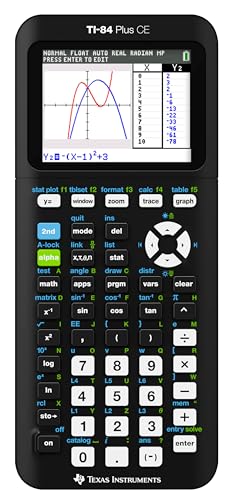
Texas Instruments TI-84 Plus CE Color Graphing Calculator, Black
High-resolution, full-color backlit display.Horizontal and vertical split-screen options..Display type : LED. Number of Items : 1.
As an affiliate, we earn on qualifying purchases.
As an affiliate, we earn on qualifying purchases.
Why Recent Tech Updates Make Scientific Calculators Smarter
Scientists and students alike love gadgets that get smarter over time. The latest scientific calculators now include features like graphing, wireless connectivity, and even programmable functions. Imagine plotting a complex parabola with a tap or sharing your results instantly to your tablet—these aren’t sci-fi anymore.
For example, the Casio fx-115 series recently added solar power, extending battery life and reducing waste. Meanwhile, some models now connect via Bluetooth to computers or phones, making data transfer a breeze.
These updates mean you can experiment more, learn visually, and save time—especially during busy exam prep or project deadlines.
Graphing capabilities allow you to visualize functions, which deepens understanding and aids in problem-solving—crucial for subjects like calculus or physics. Connectivity features facilitate quick data sharing, reducing manual transcription errors and streamlining collaborative work. Programmable functions enable users to automate repetitive calculations or create custom scripts, saving valuable time during exams or complex coursework. However, these advanced features often come with a tradeoff: increased complexity and higher cost. For students new to these tools, it’s important to balance the benefits of smarter calculators with ease of use and affordability, ensuring the device enhances learning rather than complicates it.

Texas Instruments TI-30XIIS Scientific Calculator, Black with Blue Accents (30XIIS/TBL/1L1/BK)
Robust, professional grade scientific calculator. Logs and antilogs
As an affiliate, we earn on qualifying purchases.
As an affiliate, we earn on qualifying purchases.
How to Pick the Right Scientific Calculator for Your Level
If you’re wondering whether to go basic or advanced, here’s a quick guide:
- High school students—stick to models like Casio fx-115 or Texas Instruments TI-30. They’re reliable, affordable, and approved for exams.
- College students in STEM—consider a graphing calculator like the Casio fx-9750GII or TI-84. They handle complex graphs and scripting.
- Beyond college—look into programmable calculators with CAS features for symbolic math, like the HP Prime or Casio fx-CP400.
Choosing the right calculator depends not only on your current level but also on your future needs. For example, a high school student might only need basic functions, but if there’s a chance they’ll advance to calculus or physics, investing in a graphing calculator early can be beneficial. College students should consider how much they rely on visualization and scripting—features that can make complex problems more manageable. For advanced users, programmable calculators with CAS (Computer Algebra System) capabilities can perform symbolic algebra, derivatives, and integrals, which can significantly speed up problem-solving but also require a learning curve. Matching your calculator to your coursework and learning style ensures you get the most value and avoid unnecessary expense or frustration.
Texas Instruments TI-30XIIS Scientific Calculator, Black with Blue Accents (30XIIS/TBL/1L1/BK)
Robust, professional grade scientific calculator. Logs and antilogs
As an affiliate, we earn on qualifying purchases.
As an affiliate, we earn on qualifying purchases.
Comparison Table: Scientific vs. Graphing Calculators
| Feature | Scientific Calculator | Graphing Calculator |
|---|---|---|
| Basic functions | Yes | Yes |
| Advanced math (roots, logs) | Yes | Yes |
| Trig functions | Yes | Yes |
| Graph plotting | No | Yes |
| Programming | No | Yes | (often)
| Price range | $10-$50 | $50-$150 |
In short, if you only need calculations, a scientific calculator suffices. But for visualizing functions or tackling higher-level math, a graphing calculator is worth the extra investment. Consider your coursework and future needs when choosing; a more capable device can open new learning opportunities but may require additional time to master its features.
Texas Instruments TI-30XIIS Scientific Calculator, Black with Blue Accents (30XIIS/TBL/1L1/BK)
Robust, professional grade scientific calculator. Logs and antilogs
As an affiliate, we earn on qualifying purchases.
As an affiliate, we earn on qualifying purchases.
Tips for Getting the Most Out of Your Calculator
- Read the manual—Familiarize yourself with all functions. It saves time during exams.
- Practice regularly—Use it for homework and quizzes to build confidence.
- Keep it clean and charged—A clear screen and full battery prevent errors.
- Verify exam rules—Ensure your model is allowed in test settings.
- Use memory wisely—Store key values to speed up multi-step problems.
For example, a student who memorizes how to recall stored values can solve complex physics problems faster during exams. Developing familiarity with your calculator’s features through regular practice not only boosts efficiency but also reduces anxiety during critical assessments. Proper maintenance, like keeping it clean and charged, prevents accidental errors caused by malfunction or low power. Always check exam regulations to avoid surprises—using an unapproved calculator can invalidate your test or lead to penalties. Efficient use of memory functions, such as storing intermediate results, allows you to approach multi-step problems systematically, saving time and minimizing mistakes.
Key Things to Remember When Picking Your Calculator
Choosing a calculator isn’t just about features. It’s about your needs, your exams, and your budget. Think about whether you need graphing or just basic functions. Check if the device is allowed in your upcoming test. And don’t forget to pick a model that feels comfortable in your hand and easy to operate.
Investing in the right calculator today saves frustration tomorrow. Remember, the best device isn’t always the most expensive—it’s the one that fits your goals and keeps you moving forward.
Frequently Asked Questions
What is the best scientific calculator for high school students?
The Casio fx-115 series and Texas Instruments TI-30 are top contenders. They’re affordable, easy to use, and accepted in most exams, making them ideal for high schoolers.
Are graphing calculators necessary for college courses?
While not always mandatory, graphing calculators like the TI-84 or Casio fx-9750GII are highly recommended for calculus, engineering, and physics courses. They help visualize concepts and solve complex problems faster.
Can scientific calculators handle complex number calculations?
Yes, many scientific calculators support complex number operations, making them useful for higher-level math and engineering tasks. Just check the model’s specs before buying.
Are there free calculator apps I can use instead?
Absolutely. Many smartphone apps and online calculators mimic scientific functions perfectly. Just make sure your exam rules allow using them if you plan to rely on digital tools during tests.
How do I know if a calculator is allowed in my exam?
Check the official exam guidelines. Usually, non-programmable, non-graphing models are permitted. If in doubt, ask your instructor or exam proctor beforehand.
Conclusion
Your calculator isn’t just a device—it’s a partner in your learning journey. Picking the right one means fewer headaches during exams and more time mastering concepts. So choose wisely, practice often, and let your calculator do the heavy lifting.
After all, a good calculator can turn complex problems into simple steps—making math feel a little less intimidating and a lot more manageable.